











How to Build Web Application – A Detailed Guide

Building a web application might look like something only professional developers can do, but that is not the case. With the right mindset and a solid plan, anyone with an idea can turn it into a functioning, user-focused online product. Whether you are launching a personal project, a startup platform, or a business-critical tool, knowing how to build a web application is what takes you from concept to reality.
The web remains the backbone of digital experiences worldwide, with over 1.2 billion websites active today and connectivity continuing to grow. That scale shows both opportunity and demand for web-based solutions that work well for people wherever they are.
Understanding the end-to-end process matters more than ever. This guide lays out the path from initial planning and visual design all the way through development and deployment. The goal is simple: give you a practical, actionable roadmap that cuts through jargon and complexity so you can actually build what you imagine.
This guide will help you break down the actual process from the initial planning and design stage through web application development and deployment. This blog reflects our direct experience building web applications in real projects. We have navigated the challenges, learned what works, and distilled that knowledge into a guide you can follow with clarity and confidence.
TL;DR
- Building a web application follows a clear lifecycle from planning to long term maintenance.
- Front end, back end, databases, APIs, and security all work together to deliver a reliable product.
- Cost and timeline depend on complexity, technology choices, and team structure.
- Ongoing testing, optimization, and scaling determine long term success.
Key Points
- Planning defines the problem, target users, core features, user flows, and technology stack before development begins.
- Interface design focuses on usability, consistency, accessibility, and clear visual hierarchy to guide users effectively.
- A properly configured development environment improves workflow, reduces errors, and supports faster iteration.
- Front end development handles layout, responsiveness, interactivity, and performance to shape the user experience.
- Back end development manages server logic, databases, APIs, authentication, and scalability behind the scenes.
- Databases must be structured, optimized, secured, and backed up to support reliable data handling.
- APIs enable communication between systems and allow easy integration of third party services.
- Thorough testing across functionality, devices, performance, and security reduces risk before launch.
- Deployment and hosting decisions affect availability, speed, and long term maintainability.
- Maintenance and scaling keep the application secure, fast, and relevant as user demand grows.
Key Steps to Build Web Application
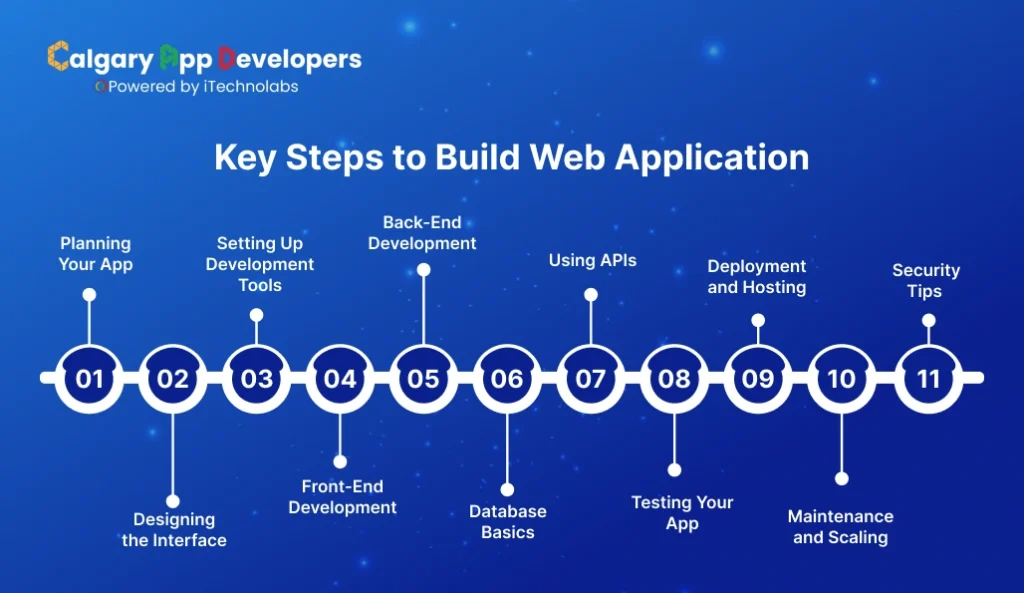
1. Planning Your App
Before writing a single line of code, planning is where your web application’s success starts. Skipping this step is a common mistake, and it often leads to wasted time, unclear goals, and a product that doesn’t meet user needs. Here’s how to approach it when you want to build web application effectively.
- Define the Purpose and Goals: Start by clearly identifying what your app will do and who it’s for. Ask yourself: What problem does this application solve? Who will use it? What outcomes do you want to achieve? This clarity will guide every decision from design to functionality.
- Outline Features and Functionality: Once the purpose is clear, make a list of features your app must have. Prioritize them into essentials and nice-to-haves. This step helps you focus on the core user experience, ensuring that the app delivers value from day one.
- Sketch User Flows and Wireframes: Visualizing how users will navigate your app is critical. Create simple wireframes or flow diagrams to map each screen and interaction. This helps you spot potential issues early and ensures a smooth, intuitive experience.
- Choose Technology and Tools: Even at the planning stage, consider the tech stack that will support your app’s functionality. Decide on frameworks, programming languages, and database options that align with your goals and future scalability.
Planning your app thoroughly sets the foundation for a successful development process. When you take the time to clarify purpose, define features, and map user journeys, building a web application becomes more structured, efficient, and focused on delivering value.
2. Designing the Interface
Once the planning is complete, the next step is designing the interface. The way your app looks and feels has a direct impact on user engagement, retention, and satisfaction. Good design is not just about aesthetics; it’s about creating an intuitive and seamless experience that guides users naturally through your application.
- Focus on User Experience: Start by thinking about how users will interact with your app. Prioritize clarity and simplicity. Every button, menu, and input field should have a purpose, helping users complete tasks quickly and easily. When designing, always put yourself in the user’s shoes.
- Create Visual Hierarchy: Organize information in a way that highlights the most important elements first. Use size, color, and spacing to guide attention. A strong visual hierarchy ensures that users understand the structure of your app without confusion.
- Design Consistent Elements: Consistency builds familiarity and trust. Maintain uniform colors, fonts, and button styles across your application. Consistent design reduces cognitive load, making the app feel professional and easier to navigate.
- Prototype Before Development: Before moving to coding, create interactive prototypes. Tools like Figma or Adobe XD allow you to simulate user interactions and flows. Prototyping helps catch design flaws early and provides a clear blueprint for developers when you build web application.
- Consider Accessibility: Designing for all users, including those with disabilities, is essential. Use readable fonts, sufficient contrast, and accessible navigation patterns. An inclusive design broadens your user base and ensures a better overall experience.
Designing the interface is where your app’s personality and usability come together. A well-thought-out design not only attracts users but also keeps them engaged, forming the foundation for a successful web application.
3. Setting Up Development Tools
Before writing code, you need the right development environment. Setting up the tools properly ensures a smoother workflow, fewer errors, and faster progress when you build web application.
- Choose a Code Editor or IDE: Start with a reliable code editor or integrated development environment. Options like Visual Studio Code, Sublime Text, or JetBrains WebStorm provide syntax highlighting, extensions, and debugging tools that make coding more efficient.
- Install Version Control: Version control is essential for managing changes and collaborating effectively. Git is the standard choice, and platforms like GitHub or GitLab help you track versions, revert mistakes, and share your project with others.
- Set Up a Local Development Server: A local server lets you test your app in a controlled environment before going live. Tools like XAMPP, WAMP, or built-in servers in frameworks allow you to run your application locally and debug issues safely.
- Install Necessary Libraries and Frameworks: Depending on your tech stack, you may need libraries, frameworks, or package managers. For example, Node.js with npm or Python with pip can manage dependencies efficiently, ensuring that your app has all the functionality it needs.
- Configure a Database: If your app requires data storage, set up a local or cloud-based database. Popular options include MySQL, PostgreSQL, or MongoDB. Make sure your development setup mirrors your production environment as closely as possible to avoid surprises later.
- Test Your Environment: Finally, confirm that everything works together. Run a simple project to ensure the editor, server, libraries, and database communicate correctly. A stable setup prevents headaches during actual development.
Setting up your development tools may take some time, but it lays the foundation for building a web application efficiently. A properly configured environment reduces errors, improves workflow, and prepares you for a smoother coding process.
Also Check: Expert Guide on Cost to Hire Calgary Web Developers
4. Front-End Development
Front-end development is where your web application becomes visible to users. It focuses on creating the parts of the app that users interact with, from layouts and buttons to forms and navigation. Mastering this stage is critical when you want to build web application that is both functional and engaging.
- Choose the Right Framework or Library: Front-end frameworks and libraries simplify development and ensure consistency. Popular options include React, Vue.js, and Angular. Selecting the right one depends on your app’s complexity, scalability, and your familiarity with the technology.
- Structure HTML and CSS Properly: Start by creating clean, semantic HTML for content structure and CSS for styling. A well-organized structure makes your app easier to maintain and ensures that it performs well across different browsers and devices.
- Implement Responsive Design: Users access web applications from a variety of devices, so responsive design is essential. Use flexible grids, media queries, and scalable elements to ensure your app looks and works perfectly on desktops, tablets, and smartphones.
- Add Interactivity with JavaScript: JavaScript brings your interface to life. From dynamic forms to animations and real-time updates, interactive elements improve user experience. Organize your scripts logically and keep performance in mind to avoid slow or buggy behavior.
- Optimize for Performance: Front-end performance affects user satisfaction and search visibility. Minify files, optimize images, and reduce unnecessary scripts. A smooth, fast-loading interface ensures that users stay engaged and don’t abandon your app.
- Test and Debug Thoroughly: Testing is crucial at every stage. Check for layout issues, browser compatibility, and interactive bugs. Tools like Chrome DevTools and browser testing platforms help identify problems early, saving time during later development stages.
Front-end development shapes the first impression of your application. By focusing on responsive design, interactivity, and performance, you ensure that users not only find your app visually appealing but also enjoy using it.
5. Back-End Development
While front-end development shapes what users see, back-end development powers how your application works. It handles data management, server logic, authentication, and all processes that happen behind the scenes. Getting this part right is essential when you want to build web application that is reliable, secure, and scalable.
- Choose the Right Programming Language and Framework: The back-end requires a server-side language and framework. Popular choices include Node.js, Python with Django or Flask, Ruby on Rails, and Java with Spring. Select one that aligns with your app’s complexity, performance needs, and your own skill set.
- Set Up a Database: Back-end development often revolves around data storage and retrieval. Choose a database that suits your application’s requirements SQL databases like MySQL and PostgreSQL for structured data, or NoSQL databases like MongoDB for flexible, document-based storage. Proper database design ensures fast, reliable access to information.
- Develop APIs and Server Logic: APIs (Application Programming Interfaces) allow the front-end to communicate with the server. Design clean, well-documented APIs for data access, user authentication, and other server-side functions. Efficient server logic ensures that the application handles requests quickly and accurately.
- Implement Authentication and Security: Security is critical for any web application. Implement user authentication, authorization, and data encryption. Protect against common vulnerabilities like SQL injection, cross-site scripting, and data leaks to maintain user trust and compliance with regulations.
- Handle Scalability and Performance: Back-end architecture should support growth. Optimize database queries, use caching, and consider load balancing to handle increased traffic. Planning for scalability from the start prevents performance bottlenecks as your application grows.
- Test and Monitor: Thorough testing and ongoing monitoring are crucial. Unit tests, integration tests, and performance checks help identify issues early. Continuous monitoring ensures the application runs smoothly in production and allows you to respond quickly to problems.
Back-end development is the engine that makes your web application function. By focusing on database design, secure server logic, and performance, you ensure that your app is not only functional but also stable and scalable.
6. Database Basics
A database is the backbone of most web applications. It stores, organizes, and retrieves information efficiently, ensuring that your app can deliver dynamic content and handle user interactions effectively. Understanding database basics is essential when you want to build web application that is reliable and scalable.
- Understand Data Models: The first step is knowing how to structure your data. Relational databases like MySQL or PostgreSQL organize data into tables with predefined schemas, making them ideal for structured information. NoSQL databases like MongoDB store data in flexible, document-based formats, which can be useful for rapidly changing or unstructured data.
- Define Tables and Relationships: In relational databases, define tables for each type of data and establish relationships between them. For example, a users table may relate to an orders table. Clear relationships make queries efficient and help prevent data duplication or inconsistency.
- CRUD Operations: Every web application relies on CRUD operations: Create, Read, Update, and Delete. These operations allow your app to interact with the database, whether adding new records, retrieving user information, updating content, or removing outdated data. Mastering these operations is crucial for a functional application.
- Query Optimization: Efficient queries make your application faster and more responsive. Use indexing, avoid unnecessary joins, and design queries to fetch only the data needed. Performance optimization at the database level prevents bottlenecks as your app scales.
- Backup and Security: Databases hold critical information, so regular backups are essential. Implement security measures such as encrypted connections, role-based access control, and validation to protect sensitive data from breaches or loss.
- Testing and Monitoring: Test your database queries during development to ensure accuracy and speed. Monitoring tools can help detect slow queries or potential issues in production, allowing you to maintain smooth operation.
A well-designed database is essential for building a web application that is fast, secure, and capable of handling growth. Understanding how data is structured, accessed, and protected ensures your app functions reliably under real-world conditions.
7. Using APIs
APIs, or Application Programming Interfaces, are the bridges that allow different software systems to communicate. When you build web application, APIs enable your app to fetch data, integrate third-party services, and extend functionality without reinventing the wheel.
- Understand Types of APIs: APIs come in different forms. REST APIs are widely used for web applications due to their simplicity and compatibility, while GraphQL offers more flexibility in retrieving data. Knowing which type suits your project is key to smooth integration.
- Integrate Third-Party Services: APIs allow your app to leverage existing services such as payment gateways, social media logins, mapping tools, or analytics. Integration reduces development time and adds powerful features without heavy coding.
- Design Your Own APIs: For larger applications, you may need custom APIs to allow front-end and back-end communication. Well-designed APIs follow clear conventions, provide proper documentation, and include authentication to ensure secure and efficient data exchange.
- Handle Requests and Responses: Understanding how to make API calls and process responses is essential. Proper error handling, data validation, and timeout management ensure that your app remains stable even when external services fail or respond slowly.
- Secure API Interactions: Security is crucial when using APIs. Use authentication tokens, HTTPS, and rate limiting to protect sensitive data and prevent misuse. Ensuring secure API communication safeguards your users and maintains trust.
- Test and Monitor: Test API integrations thoroughly during development to catch errors and inconsistencies. Continuous monitoring helps track performance, detect downtime, and ensure the application functions reliably under real-world conditions.
APIs unleash incredible possibilities and simplify development when you create web applications. By learning about, incorporating, and protecting them correctly, your application can provide more extensive features and a smooth experience.
8. Testing Your App
Testing is a critical step in the web application development process. It ensures that your app works as intended, provides a smooth user experience, and prevents costly issues after launch. When you build web application, thorough testing can be the difference between a polished product and a frustrating experience for users.
- Functional Testing: Start by verifying that all features perform correctly. Check buttons, forms, links, and workflows to ensure they behave as expected. Functional testing confirms that your app meets the requirements outlined during the planning stage.
- Cross-Browser and Device Testing: Users access web applications on different browsers and devices. Test your app on Chrome, Firefox, Safari, Edge, and various screen sizes to ensure consistent performance and appearance. Responsive design testing helps catch layout or functionality issues that might affect usability.
- Performance Testing: Speed is critical. Test load times, server response, and resource usage to identify bottlenecks. Tools like Lighthouse, WebPageTest, or JMeter can help measure performance and suggest optimizations to keep your app fast and efficient.
- Security Testing: Identify vulnerabilities that could compromise user data. Test for common issues such as SQL injection, cross-site scripting, and authentication flaws. Implement fixes early to protect your app and maintain user trust.
- User Testing: Real feedback from users provides insights that automated tests cannot. Conduct usability testing to observe how users interact with your app, identify confusing elements, and make improvements based on actual behavior.
- Bug Tracking and Iteration: Track identified issues systematically and prioritize them based on severity. Fixing bugs iteratively ensures that your app becomes more stable and reliable over time.
Testing is not a one-time task but an ongoing process. By rigorously checking functionality, performance, security, and usability, you ensure that your web application is robust, user-friendly, and ready for deployment.
9. Deployment and Hosting
After development and testing, it’s time to make your web application available to users. Deployment and hosting are critical steps that determine your app’s accessibility, performance, and reliability. When you build web application, choosing the right hosting solution and deployment process ensures a smooth launch and ongoing stability.
- Choose a Hosting Solution: Hosting options vary depending on your app’s needs. Shared hosting is cost-effective for small projects, while cloud services like AWS, Google Cloud and Azure offer scalability, flexibility, and robust performance. Consider traffic expectations, storage needs, and budget when selecting a provider.
- Prepare the Production Environment: Set up your server environment to mirror development as closely as possible. Configure web servers, databases, and necessary dependencies. Ensuring consistency between environments reduces errors and deployment issues.
- Deploy Your Application: Deployment involves transferring code, databases, and assets to the live server. Automated tools and CI/CD pipelines like GitHub Actions or Jenkins simplify this process, making updates faster and reducing the risk of human error.
- Set Up Domain and SSL: Register a domain name that reflects your brand and configure DNS settings. Enable SSL certificates to secure your site with HTTPS, which protects data and improves user trust and search rankings.
- Monitor and Maintain: After deployment, monitoring is essential. Track performance, uptime, and error logs to catch issues early. Regular updates, security patches, and backups ensure that your application remains reliable and secure over time.
Deployment and hosting are more than just launching your app; they are about ensuring accessibility, security, and performance for every user. By planning carefully and using the right tools, you can deliver a professional web application that functions smoothly from day one.
10. Maintenance and Scaling
Building a web application doesn’t end at launch. Regular maintenance and planning for growth are crucial to keep your app reliable, secure, and capable of handling increasing traffic. When you build web application, maintenance and scaling strategies ensure long-term success and a positive user experience.
- Regular Updates and Bug Fixes: Continuously monitor your application for errors, performance issues, or outdated dependencies. Apply updates to frameworks, libraries, and server environments to prevent security vulnerabilities and maintain smooth functionality.
- Performance Optimization: As user numbers grow, optimize your app to handle increased load. Techniques include database indexing, caching, code refactoring, and minimizing heavy resources. Improving performance keeps your app responsive even under high traffic.
- Monitoring and Analytics: Use monitoring tools and analytics to track user behavior, server performance, and potential issues. This data provides insights for improvements and helps anticipate challenges before they affect users.
- Scaling Infrastructure: Plan for scaling both vertically and horizontally. Vertical scaling increases server capacity, while horizontal scaling adds more servers to distribute the load. Cloud services and containerization tools make scaling more efficient and cost-effective.
- Security and Compliance: Ongoing maintenance includes security checks and ensuring compliance with regulations. Regular audits, penetration testing, and data backups protect your app and user information.
- User Feedback and Feature Updates: Listen to users and adapt your app accordingly. Adding new features, refining workflows, or adjusting the interface based on feedback keeps the application relevant and engaging over time.
Maintenance and scaling are critical parts of the lifecycle when you build web application. By staying proactive, monitoring performance, and preparing for growth, your app can continue delivering value and remain competitive in a constantly evolving digital landscape.
11. Security Tips
Security is a non-negotiable aspect of web application development. Protecting your app and its users from threats ensures trust, compliance, and long-term success. When you build web application, incorporating security best practices from the start reduces risks and prevents costly breaches.
- Implement Strong Authentication: Require secure passwords, use multi-factor authentication, and manage user sessions carefully. Strong authentication practices prevent unauthorized access and protect sensitive data.
- Use HTTPS and Data Encryption: Encrypt data in transit using HTTPS and secure sensitive information in databases with encryption. This protects user data from interception and tampering.
- Validate User Input: Always validate and sanitize user input to prevent attacks like SQL injection or cross-site scripting. Never assume input is safe, even from trusted users.
- Keep Software Updated: Regularly update your frameworks, libraries, and server software. Security vulnerabilities are often discovered in outdated components, so timely updates are essential.
- Implement Access Controls: Limit access to data and functionality based on user roles. Only authorized users should perform sensitive operations, reducing the risk of accidental or malicious damage.
- Regular Backups and Monitoring: Perform routine backups to recover quickly from data loss or attacks. Continuous monitoring for suspicious activity helps detect potential breaches before they escalate.
- Follow Security Standards: Adhere to established security guidelines like OWASP recommendations. Following these standards ensures your app meets industry best practices for protection.
Prioritizing security when you build web application protects both your users and your reputation. By implementing strong authentication, encryption, validation, and monitoring, you create a safer, more trustworthy platform that users can rely on.
Also Check: Top Web Development Companies in Calgary
Cost and Timeline Considerations to Build Web Application:
Building a web application typically costs between $5,000 and $50,000, depending on complexity, features, and technology choices. Understanding cost breakdown and timelines helps plan your project realistically and avoid surprises.
Estimated Cost and Timeline
| Phase | Estimated Cost (USD) | Timeline |
| Planning & Research | $500 – $1,500 | 1 – 2 weeks |
| UI/UX Design | $800 – $3,000 | 2 – 4 weeks |
| Front-End Development | $1,500 – $7,000 | 3 – 6 weeks |
| Back-End Development | $2,000 – $10,000 | 4 – 8 weeks |
| Database Setup | $500 – $2,000 | 1 – 2 weeks |
| API Integration | $500 – $3,000 | 1 – 3 weeks |
| Testing & Debugging | $800 – $3,500 | 2 – 4 weeks |
| Deployment & Hosting | $200 – $1,000 | 1 week |
| Maintenance & Updates (Monthly) | $200 – $800 | Ongoing |
Factors Affecting the Cost to Build Web Application
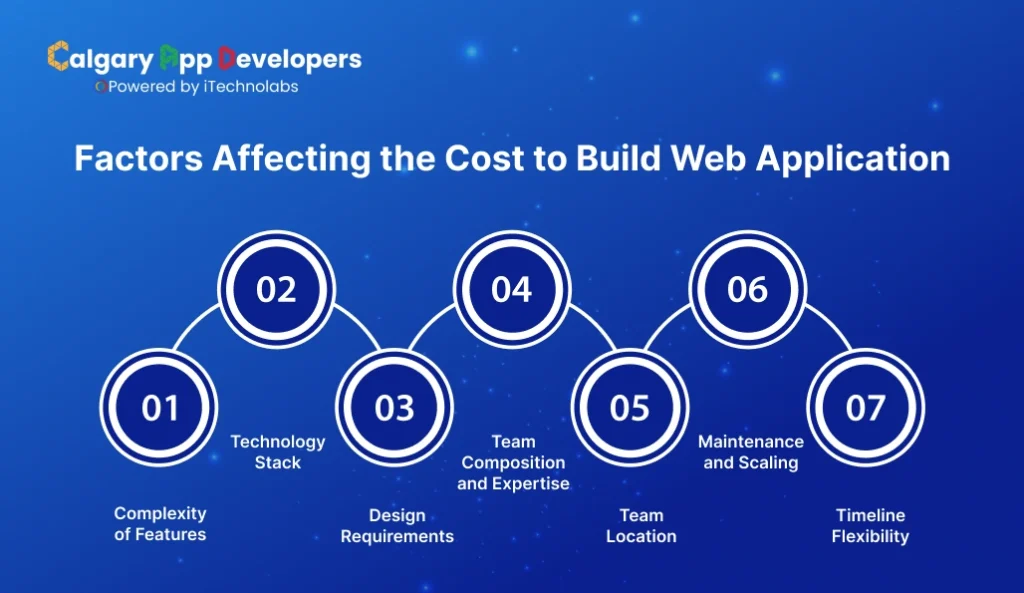
- Complexity of Features
The more complex your web application, the higher the cost. Advanced functionalities like real-time updates, AI-driven tools, multi-user dashboards, or integrated payment systems require more development time and expertise, directly increasing expenses.
- Technology Stack
The programming languages, frameworks, and tools you choose affect both development speed and cost. Some technologies require specialized skills or paid licenses, while others are open-source and more budget-friendly. Selecting the right stack can save money while ensuring scalability.
- Design Requirements
Custom designs, animations, and high-fidelity prototypes take longer to create than pre-built templates. Investing in a polished, intuitive interface improves user experience but adds to initial costs.
- Team Composition and Expertise
The experience and roles of your development team play a significant role in cost. Hiring senior developers, designers, and QA specialists may be more expensive, but their expertise reduces errors, ensures faster delivery, and often saves money in the long run.
- Team Location
Where your team is located also influences cost. Developers in North America or Europe may charge higher rates than teams in other regions. Calgary offers a strong balance of talent and cost, with skilled professionals available at competitive rates for high-quality web application development.
- Maintenance and Scaling
Ongoing maintenance, server scaling, security updates, and feature expansions are recurring costs that should be planned for. Ignoring these can lead to unexpected expenses and performance issues as your app grows.
- Timeline Flexibility
Shorter deadlines often require more developers or overtime work, increasing overall project cost. Longer, well-planned timelines allow for steady progress, quality assurance, and optimized budgeting.
Understanding cost and timeline when you build web application ensures you allocate resources efficiently and avoid delays. Careful planning allows you to balance features, quality, and budget effectively.
Final Words:
Building a web application is a structured journey, from planning and design to development, testing, deployment, and ongoing maintenance. Each stage plays a crucial role in delivering a reliable, secure, and user-friendly application. Understanding the process, estimating costs, and planning timelines carefully ensures your project stays on track and meets user expectations.
If you’re looking to bring your ideas to life efficiently and professionally, Calgary App Developers can help a leading web app development company in Calgary, Canda. Our team combines technical expertise with creative design to build web applications that perform seamlessly, scale effectively, and meet your business goals. With experience in front-end and back-end development, database management, API integration, and security, we provide end-to-end solutions tailored to your needs.
When you partner with Calgary App Developers, you’re not just building a web application; you’re creating a platform designed to grow with your business, engage your users, and deliver long-term value.
FAQ’s About Build Web Application
1. What skills do you need to build a web application?
You need a basic understanding of HTML, CSS, and JavaScript for the front end, plus one back-end language like Node.js or Python. Familiarity with databases, APIs, and version control helps. You do not need to master everything at once. Many developers learn step by step while building real projects.
2. How long does it take to build a web application?
The timeline depends on scope and complexity. A simple web application may take 1 to 2 months, while a feature-rich or scalable product can take three to six months or more. Planning, testing, and revisions often take as much time as coding, so realistic timelines are critical.
3. How much does it cost to build a web application?
Costs vary based on features, design quality, technology stack, and team size. A basic application can cost about $5,000, while complex platforms with custom design, APIs, and security features can reach $50,000. Ongoing maintenance and hosting should always be included in the budget.
4. What is the difference between front-end and back-end development?
Front end development focuses on what users see and interact with, including layouts, buttons, and responsiveness. Back-end development handles server logic, databases, authentication, and data processing. Both work together. A strong application needs a well-designed interface supported by reliable server-side functionality.
5. Do you need APIs to build a web application?
Most modern web applications use APIs. APIs allow the front end and back end to communicate and make it easier to integrate services like payments, maps, or analytics. Even simple applications often rely on APIs for data handling. Well-designed APIs also make scaling and future updates easier.
6. How do you keep a web application secure?
Security starts with strong authentication, input validation, and encrypted connections. Regular updates, role-based access control, secure APIs, and backups are essential. Ongoing monitoring helps detect issues early. Following established security best practices reduces risk and protects both user data and the application itself.


Pankaj Arora is a seasoned technology leader and the Founder of Calgary App Developer, with 10+ years of expertise in crafting high-performance digital solutions. His core competencies include full-stack app development, cloud-native architecture, API integration, and agile product delivery. Under his leadership, Calgary App Developers has empowered startups and enterprises alike with scalable mobile applications, secure web platforms, and AI-driven SaaS products.