







How to Create Online Ordering for Restaurants
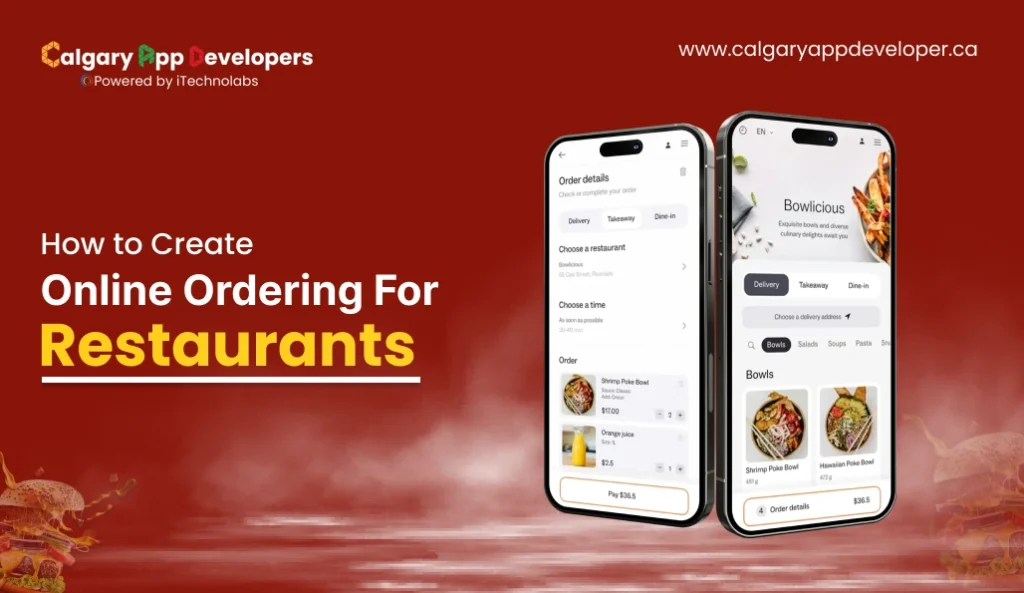
Launching an online ordering system has become one of the most essential shifts for restaurants aiming to thrive in the digital era. The evolution of consumer behavior, shaped by fast-paced lifestyles and technological convenience, has made digital ordering a primary expectation rather than just an added bonus. Today’s diners want to browse, customize, and pay for their meals from their phones or laptops, creating a direct link between the kitchen and the customer’s doorstep.
According to a report, the global online food delivery market size is expected to reach USD 505.50 billion by 2030, with a compound annual growth rate (CAGR) of 9.4 % from 2025 to 2030.
Technology isn’t just transforming customer convenience; it’s now at the heart of restaurant profitability, efficiency, and long-term resilience. With nearly 60% of operators reporting incremental sales from digital channels, implementing an online ordering system is more than a competitive advantage: it’s quickly becoming an industry standard.
So, Demand is real and rising, but so is competition and platform complexity. This blog lays out the minimal features, the common technical approaches, cost drivers, and launch checklist you need to turn that demand into dependable orders and healthier margins.
- Online ordering has become a core driver of restaurant growth.
- A reliable system depends on strong design, smooth workflows, and accurate integrations.
- Costs vary widely based on features, customization, and development choices.
- A clear step-by-step process helps restaurants launch confidently and improve over time.
- Online ordering demand continues to rise, supported by global market growth and shifts in consumer behavior.
- A complete system relies on three layers: the customer interface, kitchen and staff operations, and business control settings.
- Essential features such as real-time availability, secure payments, customization options, and internal workflow tools create a stable and predictable ordering experience.
- The development process includes goal setting, system architecture planning, customer experience design, integrations, workflow configuration, and continuous testing.
- Total project cost depends on scope, design depth, integrations, hosting needs, customization level, and developer location.
- Hiring teams in efficient regions can reduce cost while maintaining strong technical quality.
- A well-built online ordering system supports long-term revenue growth, operational clarity, and better customer relationships.
Understanding the Core of Online Ordering for Restaurant Operations
Online Ordering for Restaurant operations works best when it is built on a clear, predictable structure. The goal is simple. Give guests an easy path to place an order and give the restaurant full control over how those orders move through the kitchen, staff, and business systems.
A strong setup is built on three connected layers. Each one supports the next and together they shape the full ordering experience.
1. Customer Interface
This is the part customers see and interact with. It guides them from browsing to checkout.
Key elements include
- Clean and accurate digital menus
- Clear customization options
- Pickup and delivery choices that fit your workflow
- Fast and secure payment flow
- Mobile-friendly layout for higher conversion
2. Operational Engine
This is where orders turn into action. It keeps the kitchen and staff in sync.
Important functions include
- Automatic ticket routing to the right station
- Real-time preparation timing
- Inventory updates that prevent unavailable items
- Order status tracking for customers and staff
- Tools that help staff manage peak hour volumes
3. Business Control System
This gives owners and managers the flexibility to adapt without technical hurdles.
Core capabilities include
- Menu and price management
- Location settings and store hours
- Promotions and offer controls
- Tax and compliance settings
- Access to customer and order data for decision-making
When these three layers work together, Online Ordering for Restaurant use becomes more than a convenience tool. It becomes a dependable revenue channel and a foundation for better customer relationships, smoother operations, and long-term growth.
Also Read: Top Food Ordering App for Restaurants
Essential Features Every Online Ordering System for Restaurants Needs
Online Ordering for Restaurant operations depends on features that keep the customer journey simple and the internal workflow steady. These elements form the backbone of a system that delivers consistent results for both guests and staff.
- Easy-to-Navigate Digital Menu: A digital menu should load fast, present items clearly, and group categories in a way that mirrors real dining behavior. Strong visuals and accurate descriptions guide customers toward confident choices.
- Customization and Add-On Controls: Guests want flexibility. Portion changes, add-ons, and modifiers should be easy to select. Clear pricing updates keep the experience transparent and help customers build an order that matches their preferences.
- Real-Time Availability and Timing: Accurate preparation times and automatic inventory updates prevent order failures. Customers should immediately see when an item is unavailable or when preparation may take longer than usual.
- Secure and Quick Payment Processing: A smooth checkout flow encourages conversions. Support for common payment methods, saved cards, and fast processing helps reduce friction while maintaining strong security.
- Order Tracking for Customers: Customers appreciate clarity. Real-time updates from order received to ready for pickup help reduce uncertainty and improve satisfaction without adding pressure to the staff.
- Integrated Kitchen and Staff Workflow: A dependable system connects the front end to the kitchen. Automatic routing, clear order queues, and organized displays help teams handle busy periods without mistakes.
When these features work together, Online Ordering for Restaurant operations becomes predictable, efficient, and profitable. This foundation sets the stage for steady growth and a customer experience that feels easy every time someone orders.
Read Also: How to Create a Branded Mobile App for Restaurants?
How to Build an Online Ordering for Restaurants Step by Step
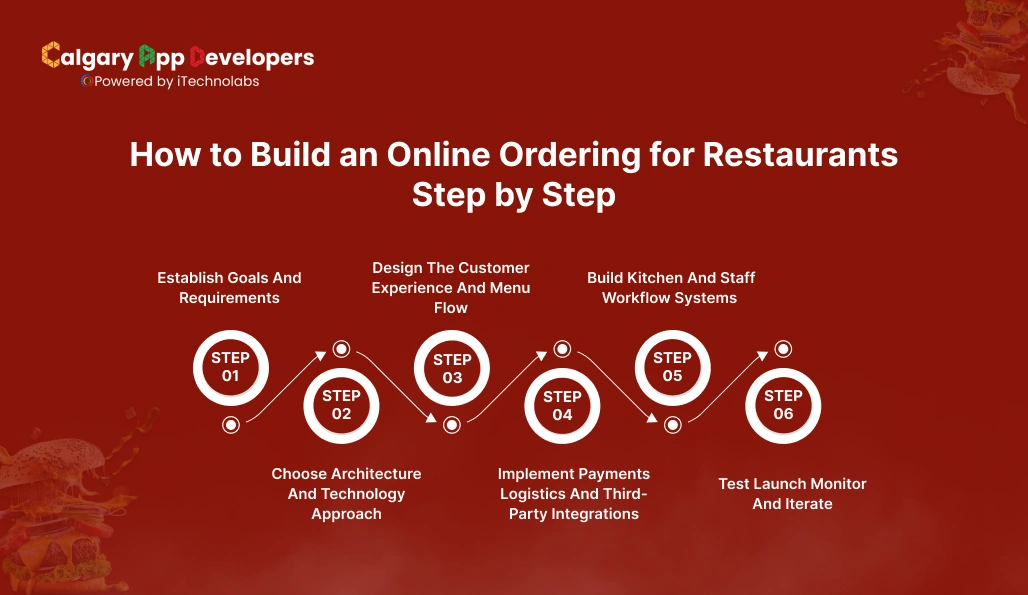
Building an Online Ordering for Restaurant operations involves more than adding a menu on a website. It requires a structured plan that aligns technology, customer experience, and internal workflows. The steps below walk through the full process in a detailed and practical way.
Step 1: Establish Goals And Requirements
Start by defining why you want Online Ordering for Restaurant operations and what success looks like.
- Set clear business goals such as higher order volume, improved turnaround time, better customer retention, or reduced dependency on delivery marketplaces.
- Identify customer groups, their ordering habits, preferred devices, and typical order value.
- Outline operational limits such as kitchen load, staff availability, delivery reach, prep time expectations, and hours of operation.
- Create a feature roadmap that prioritizes what matters most, such as a strong menu flow, payments, loyalty, delivery management, or multi-location support.
- Review competitors to understand standards, common failures, and opportunities to differentiate.
This step creates the framework your entire system will follow and prevents expensive changes later.
Step 2: Choose Architecture And Technology Approach
Your technical direction determines speed, flexibility, and long-term maintenance.
- Compare three paths: a ready-to-use SaaS tool, a white-label restaurant platform, or a fully custom build. Each option affects cost, branding freedom, and scalability.
- Select technologies for the front end, back end, and database that can handle spikes during weekends and festivals.
- Define how the system will integrate with the point of sale, kitchen display systems, inventory tools, and any existing delivery partners.
- Plan hosting and security standards that protect customer data, payment details, and transaction logs.
- Document compliance needs such as local tax rules, digital invoice requirements, and payment regulations.
A well planned architecture prevents outages, checkout failures, and integration conflicts.
Step 3: Design The Customer Experience And Menu Flow
A strong customer experience is the heart of Online Ordering for Restaurant success.
- Map every touchpoint from landing on the site to completing a payment. Look for places where customers commonly drop off.
- Build a menu structure that feels natural, groups items logically, and loads immediately even on slower networks.
- Add clear categories, modifiers, add-ons, portion sizes, and pricing transparency to reduce friction.
- Use high-quality images, simple descriptions, and clear calls to action to guide decision-making.
- Create prototypes of each screen and test them with staff or real customers to catch usability issues early.
A well-designed flow increases conversion and reduces abandoned carts.
Step 4: Implement Payments Logistics And Third-Party Integrations
This stage connects your digital system with real-world operations.
- Integrate a payment gateway that supports cards, wallets, UPI, and local methods while keeping transactions fast and secure.
- Configure delivery management whether you use your own riders or connect through a logistics API. Ensure accurate ETAs and delivery fee logic.
- Sync real-time inventory with the point of sale so customers never order items that are out of stock.
- Implement customer notifications through email, SMS, or WhatsApp for order confirmation, preparation updates, and ready for pickup.
- Set up receipts, invoices, and tax documents that align with local regulations.
Strong integrations remove manual workload and help orders move smoothly from customer to kitchen.
Step 5: Build Kitchen And Staff Workflow Systems
The internal engine determines how reliably your restaurant can handle volume.
- Use a kitchen display or ticketing system that routes orders to the correct station without confusion.
- Add rules that prioritize items, batch similar tickets, and maintain prep accuracy during busy periods.
- Provide easy-to-read staff dashboards that show incoming orders, special instructions, order age, and delivery timing.
- Train frontline teams on the new system so they understand how to accept, hold, cancel, and adjust orders when needed.
- Collect operational feedback during the first few weeks to refine prep times, menu logic, and staff responsibilities.
A strong backend keeps service smooth and prevents bottlenecks.
Step 6: Test Launch Monitor And Iterate
Going live is not the final step. Continuous improvement is what makes Online Ordering for Restaurant operations sustainable.
- Start with internal testing followed by a small public pilot to see how the system performs under real conditions.
- Monitor metrics such as checkout conversion rate, average order value, order accuracy, customer satisfaction, and delivery completion time.
- Review customer messages and staff reports to spot recurring issues like menu confusion, long prep times, or payment errors.
- Refine menu layout, pricing, delivery workflows, and performance speed based on actual usage trends.
- Develop an ongoing roadmap for new features such as loyalty programs, scheduled orders, table pickup, or subscription-based meals.
Testing and iteration ensure your system stays competitive and reliable in a growing digital market.
Practical next steps
- Convert all requirements into a phased implementation plan with clear deadlines and responsible owners.
- Prepare staff training, backup systems, and customer communication for launch week.
- Set up analytics, heatmaps, and feedback tools so improvements never stop.
A well-executed process creates an Online Ordering for restaurants that delivers consistent orders, supports busy kitchens, and strengthens your customer relationships over time.
Also Read: How to Boost Sales With Online Ordering Platform for Restaurants
What Does It Really Cost to Build an Online Ordering System for Restaurants?
Building an Online Ordering for Restaurant operations typically costs between $8,000 and $60,000 depending on features, integrations, design depth, and long-term scalability needs. Custom builds with advanced delivery logic or multi-location control can go beyond this range.
Estimated Cost Breakdown for an Online Ordering for Restaurants
| Stage of Development | What This Stage Covers | Estimated Cost (USD) |
| Planning and Requirement Analysis | Goals, feature mapping, workflows, competitive research, system architecture planning | $500 to $2,000 |
| UI and UX Design | Wireframes, menu layout, customer journey screens, mobile responsive design | $800 to $5,000 |
| Front-End Development | Customer interface, menu screens, cart, customization logic, checkout flow | $2,000 to $12,000 |
| Back-End Development | Database, order processing, authentication, menu management tools, business controls | $2,500 to $15,000 |
| Integrations | POS sync, payments, delivery APIs, notifications, analytics setup | $1,000 to $10,000 |
| Kitchen and Staff Workflow Setup | KDS setup, ticket routing, operational dashboards, staff tools | $800 to $6,000 |
| Testing and Quality Assurance | Usability testing, performance checks, bug fixes, load testing | $500 to $4,000 |
| Deployment and Launch | Hosting setup, security configuration, monitoring tools, launch support | $400 to $3,000 |
| Ongoing Maintenance | Updates, technical support, security patches, minor improvements | $100 to $500 per month |
Total Estimated Cost: USD 8,000 to USD 60,000+
Your final cost depends on how deeply you want to customize the experience. A basic system can be affordable and quick to launch, while a fully tailored Online Ordering for restaurants offers stronger long-term control but requires a higher upfront investment. The right choice comes down to your goals, scale, and operational needs.
Key Factors That Influence Online Ordering System Costs
The cost of building Online Ordering for Restaurant operations depends on several decisions made during planning, design, development, and integration. Understanding these factors helps you estimate budgets accurately and avoid surprises later.
- Scope of Features and Functionality
The wider your feature set, the higher the development cost.
- Basic features such as a digital menu, cart, checkout, and payment flow fall on the lower side of the cost range.
- Mid-level features such as real-time availability, item modifiers, delivery tracking, and loyalty tools increase the budget.
- Advanced features such as multi-location management, dynamic pricing, custom delivery logic, scheduled orders, or enterprise reporting require additional engineering time.
- Front End and UI Design Quality
Design is a major cost driver because it shapes the customer experience.
- Simple layouts with standard components cost less.
- Tailored visuals, detailed menu structures, high-resolution imagery, and interactive elements add to both design and development hours.
- A fully custom branded interface requires more rounds of prototyping and testing.
| Design Level | Description | Estimated Range |
| Basic | Clean layout with essential screens | $500 to $1,500 |
| Standard | Mobile-focused design with branded visual themes | $1,500 to $4,000 |
| Advanced | Custom layouts, animations, detailed menu interactions | $4,000 to $8,000 |
- Integrations With POS, Payments, and Delivery Partners
Integrations significantly influence cost because they require coordination with external systems.
- Integrating a payment gateway is usually straightforward but still needs secure configuration and testing.
- POS and inventory integrations require more technical mapping and validation because menu data, pricing, and availability must sync accurately.
- Logistics or delivery partner APIs add another layer of complexity, such as handling routes, ETAs, and delivery fee logic.
| Integration Type | Complexity | Estimated Range |
| Payments | Low to moderate | $300 to $1,500 |
| POS and Inventory | Moderate to high | $1,000 to $5,000 |
| Delivery APIs | High | $1,500 to $6,000 |
- Technology Stack and Hosting Requirements
Your choice of technologies affects development time and long-term stability.
- Modern frameworks with reusable components reduce cost and speed up development.
- Complex tech stacks and custom infrastructure require specialized developers, which increases overall cost.
- High-traffic restaurants and multi-location setups need stronger hosting resources, load management, and security.
- Location of the Development Team
Developer location affects hourly pricing and total project cost. Rates vary widely across regions because of cost of living, talent availability, and local market demand.
Average Hourly Pricing by Region
| Region | Average Hourly Rate | Notes |
| Calgary | $25 to $45 | Consistently lower rates with strong technical talent |
| India | $30 to $60 | Competitive pricing and large developer pool |
| Eastern Europe | $40 to $80 | Skilled teams with midrange pricing |
| United States | $80 to $150 | Highest rates due to labor and compliance costs |
| Western Europe | $70 to $120 | Strong development standards at higher pricing |
Hiring teams in cost-efficient regions like Calgary helps restaurants secure solid engineering quality without straining budgets.
- Level of Customization
Customization levels strongly influence cost.
- Template-based setups are affordable and quick to deploy.
- Semi-custom builds allow good branding control at moderate cost.
- Fully custom systems demand extensive engineering and testing.
- Ongoing Maintenance and Support Needs
Support needs continue after launch.
- Basic maintenance includes bug fixes, performance checks, and small content updates.
- Feature expansion, such as new delivery rules, loyalty upgrades, or menu automation, raises the ongoing budget.
- Large or multi-location operations require structured support due to frequent menu and pricing changes.
Also Check: Top POS Systems for Restaurants with AI Tools
Final Words
Online Ordering for Restaurant operations has moved from a nice extra to a core part of how modern restaurants grow. A well-built system improves customer convenience, reduces pressure on staff, and creates a steady stream of repeat orders. The key is planning every layer with care. That includes the menu experience, the workflow inside the kitchen, the integrations that keep data aligned, and the long-term support needed to keep everything running smoothly.
If you want a system that feels dependable from day one, it helps to work with a development team that understands both restaurant operations and digital product building. Calgary App Developers brings that combination together with practical development, clear communication, and efficient project delivery. We help restaurants build online ordering systems that are easy to use, cost-effective to maintain, and ready for growth.
A strong digital strategy does not have to feel complicated. With the right team and a clear process, you can launch Online Ordering for Restaurant operations that brings in more customers and supports your business for years to come.


Pankaj Arora is a seasoned technology leader and the Founder of Calgary App Developer, with 10+ years of expertise in crafting high-performance digital solutions. His core competencies include full-stack app development, cloud-native architecture, API integration, and agile product delivery. Under his leadership, Calgary App Developers has empowered startups and enterprises alike with scalable mobile applications, secure web platforms, and AI-driven SaaS products.