




Vibe Coding: Smart Guide For Vibe Coding Tools & Platforms
If you’ve spent any time around dev communities on X or YouTube lately, you’ve probably seen a wave of new lingo: cracked, cooked, lock in, and of course, vibe coding. These aren’t just internet quirks. They’re part of a broader shift in how people are talking about and building software.
Vibe coding is what happens when AI stops being a helper and starts acting like a true collaborator. You don’t micromanage the code. You guide the outcome. You describe what you want to build, tweak the results, and move fast. It’s a creative, conversational way of programming that’s quickly becoming the go-to approach for solo builders, indie hackers, and early-stage teams.
For startups looking to move fast and stay lean, hire vibe coders who can ship products with speed and creativity using this new development style.
This guide walks you through everything you need to know: what vibe coding actually is, how it compares to traditional development, which vibe coding tools are leading the movement, and how to start using them right now.
Let’s break it down.
- Vibe coding is an AI-driven approach where developers guide outcomes through natural language instead of writing every line manually.
- It accelerates idea-to-prototype speed, especially for MVPs and early-stage projects.
- Different tools support vibe coding across visual builders, IDE integrations, extensions, and autonomous agents.
- It complements traditional programming rather than replacing it, especially for complex production systems.
- Vibe coding shifts the focus from instructing how to build software to describing what should be built, allowing AI to generate and iterate on code conversationally.
- This approach significantly reduces development time for prototypes, experiments, and early-stage products by enabling rapid feedback loops and continuous iteration.
- Visual full-stack builders allow users to create complete applications, including backend logic and authentication, without opening a traditional IDE.
- AI-powered IDEs and extensions integrate directly into development environments, helping engineers refactor, debug, write tests, and manage large codebases more efficiently.
- Autonomous coding agents represent the next evolution of vibe coding, handling multi-step tasks such as planning, building, testing, and committing code with minimal manual input.
- Vibe coding works best during early product development, while traditional programming remains critical for maintaining scalability, performance, security, and long-term code quality.
What Is Vibe Coding?
Vibe coding is a style of software development approach where you describe what you want to build, and an AI tool helps you generate, edit, and iterate on the code—almost like a creative collaborator.
You’re not writing every line by hand. You’re guiding the process through natural language prompts, feedback, and real-time adjustments. It’s fast, conversational, and highly iterative.
The phrase vibe coding first gained real traction when Andrej Karpathy dropped a tweet that resonated with millions. In it, he described a style of programming that wasn’t about carefully crafting each line of logic but about vibing with an AI assistant until the result looked right and worked. Think less “tell the machine how,” more “tell it what,” and iterate from there.
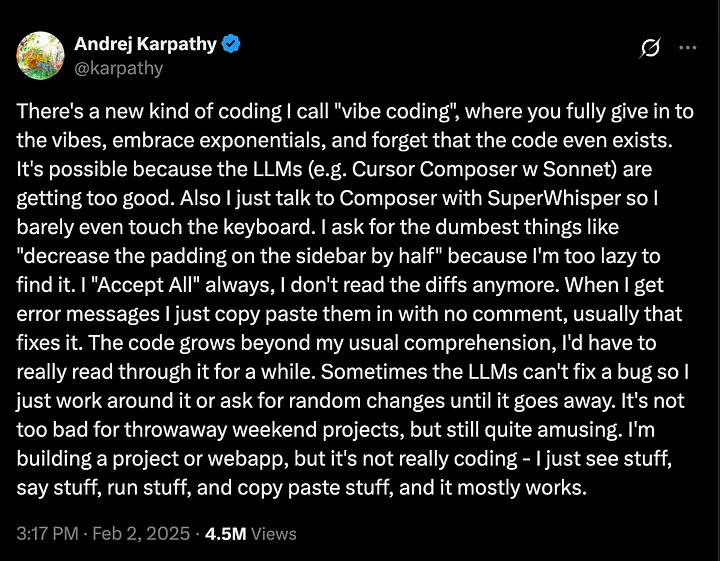
That one post has since been viewed over 4.5 million times, and what followed was an explosion of tools, screenshares, demos, and experiments. To be fair, many of the tools already existed, but now they had a label. A movement. A name that made it okay, even exciting, to just start building.
Think of it as the difference between drawing blueprints for a house and working with a builder who just gets your vision and starts sketching in real time.
At its core, vibe coding is about:
- Building through conversation, not commands
- Prioritizing outcomes over implementation details
- Using AI to accelerate from idea to working product
It doesn’t mean giving up control. It means shifting how you think about control—and using tools that help you move at the speed of thought.
Also Read: AI App Development: Build Intelligent Solutions
Vibe Coding vs Traditional Programming
Traditional programming is about precision. You write instructions line by line. You manage logic, data flow, architecture, dependencies, and every edge case. The computer does exactly what you tell it—nothing more, nothing less.
Vibe coding flips that on its head.
Instead of detailing every step, you describe the outcome you want. The AI figures out how to get there. It’s like asking a collaborator to build a login page with Supabase auth and Stripe payments, then tweaking the results as they come back. You’re guiding, not dictating. And that changes everything.
This shift from how to what has real implications:
- Speed: You can go from idea to prototype in hours, not weeks.
- Accessibility: Non-traditional developers can now build working apps with minimal syntax knowledge.
- Creativity: You’re free to explore and iterate without getting bogged down in boilerplate.
But here’s the thing—this only works up to a point.
Vibe coding shines in the early stages, when you’re building something new and fast. Day 0. But once you’re deep in a production codebase with complex systems, data flows, and team collaboration, how things are built starts to matter again. Bugs, tech debt, testing, security—none of that can be hand-waved away.
So while vibe coding opens the door to faster, more expressive development, it doesn’t replace traditional programming. It augments it. And knowing when to switch between the two is what makes a good developer great.
Comparison Overview:
| Aspect | Traditional Programming | Vibe Coding |
| Approach | Step-by-step instructions written by the developer | High-level prompts interpreted by AI assistants |
| Control | Full control over logic, structure, and implementation details | You guide outcomes; AI handles the implementation |
| Speed | Slower setup and iteration—more manual effort | Rapid prototyping and faster feedback loops |
| Accessibility | Requires strong technical skills and syntax knowledge | More beginner-friendly—less coding experience required |
| Creativity | Can be constrained by boilerplate and setup | Frees up time and energy for experimentation and iteration |
| Best For | Large, complex, production-grade systems | Early-stage projects, MVPs, quick experiments |
| Limitations | Time-consuming, repetitive tasks | Limited precision, less reliable for complex edge cases |
| Team Collaboration | Built for structured workflows and reviews | Still evolving—can be hard to track changes or maintain quality |
| Testing & Debugging | Manual and methodical | Vibe-coded results may need extra review or refinement |
How the Vibe Coding Process Actually Works
At first glance, vibe coding might seem like you’re just chatting with an AI and magically getting a working app. But there’s a real, structured process happening beneath the surface—one that blends natural language, code generation, context memory, and iterative feedback.
Let’s walk through it step by step.
Step 1: You Start with a Prompt
Vibe coding begins with intent. You describe what you want to build using natural language. This could be a simple sentence:
“Build a to-do list app with a clean UI and local storage.”
Or it could be much more detailed:
“Create a full-stack dashboard with login/signup using Supabase auth, data pulled from an external API, and a chart to display analytics.”
The more specific your prompt, the better the output—but the beauty of vibe coding is that you don’t need to get it perfect on the first try.
Step 2: The AI Generates Code (and Often UI)
Once your prompt is in, the tool gets to work. It uses pretrained models to generate:
- Functional code (frontend, backend, or both)
- Suggested folder structure
- UI layout and styling (in visual builders)
- Documentation, user flows, or PRDs (in tools like Tempo Labs)
Depending on the tool you’re using, you might see a live preview of the app, editable components, or code injected straight into your IDE.
Step 3: You React, Adjust, and Iterate
Here’s where the “vibe” part kicks in.
You look at what was generated and start making changes—not by rewriting code manually (though you can), but by prompting again.
“Make the navbar sticky.”
“Change the chart to a bar graph.”
“Connect this form to Supabase and store the submissions.”
You’re not programming line-by-line. You’re nudging the AI. Shaping the output. And because feedback is fast, iteration becomes a loop: ask, generate, tweak, repeat.
Step 4: Code Merges and Context Management
In more advanced tools like Cursor, Continue, or Sourcegraph, the AI starts remembering your codebase. It builds context over time—what files exist, how components connect, what patterns you’re using—so future suggestions feel smarter and more relevant.
But here’s the tradeoff: as your project grows, the AI’s context can get noisy. That’s why some tools let you define rules, context windows, or memory files to steer the AI. It’s not totally hands-off. You’re still the architect.
Step 5: Switch Between Visual, Agentic, and Manual
Depending on the tool, vibe coding happens on a spectrum:
- Visual Tools (like Lovable.dev and Bolt.new) let you click, drag, and prompt your way through full-stack apps.
- Agentic IDEs (like Cursor and Windsurf) let you chat with the AI inside your codebase. It can edit files, write tests, fix bugs, and more.
- CLI/Terminal Tools (like Aider or Claude Code) work with plain-text interfaces but still support conversational code changes and memory tracking.
Many developers move between these modes as needed. You might prototype visually, then switch to an IDE to refine the logic, then drop to terminal tools for debugging or automation.
Read Also: Top AI Companies In Canada to Know
Vibe Coding Tools & Platforms For 2026
Before picking a vibe coding tool or platform, ask yourself a simple question: what are you actually trying to build?
Not every tool is built for every type of project. Some are great for spinning up full-stack apps in a few hours. Others are designed to help you refactor a massive codebase without breaking anything. A few aim to work like full-on autonomous developers.
Vibe coding isn’t one workflow—it’s a collection of tools built for different goals. So here’s a breakdown of the main categories and how to think about them:
- Full-Stack App Builders
These vibe coding tools let you go from a blank canvas to a fully working web app—UI, backend, database, authentication, payments, deployment—without writing much (if any) traditional code.
Best for:
- Indie hackers launching MVPs
- Solo founders testing ideas
- Designers who want to build without learning full-stack frameworks
Examples:
- Tempo Labs
- Bolt.new
- Lovable.dev
- Replit
- Base44
- UI/Frontend Builders
These vibe coding tools focus on the visual layer. You might not get full backend capabilities, but you can design, preview, and modify interfaces using prompts or drag-and-drop components.
Best for:
- Designers building interactive mockups
- Developers working on frontend-heavy apps
- Teams focused on UX and iteration speed
Often built into:
- Full-stack tools like Bolt.new or Lovable.dev
- Figma-to-code tools (some AI-enhanced)
- Code Refactoring & Editing Tools
These are vibe coding tools that live inside your IDE—typically as VS Code forks or extensions—and help you improve, modify, or extend existing codebases using AI.
Best for:
- Engineers working in large, complex projects
- Teams that care about structure, readability, and maintainability
- Developers who want AI support without leaving their editor
Examples:
- Cursor
- Windsurf
- Continue
- Cline
- Sourcegraph (Cody)
- Amp
- Autonomous Coding Agents
These vibe coding tools aim to go beyond suggestions. They plan, build, test, and debug entire workflows based on high-level prompts. Think of them as AI coworkers you brief, not AI tools you command.
Best for:
- Advanced users experimenting with automation
- Developers who want to prototype fast and watch AI handle execution
- One-person teams who want to offload grunt work
Examples:
- Devin
- Claude Code
- Aider
Full Stack Visual Builders
If there’s one area where vibe coding feels like pure magic, it’s full-stack visual builders. These are tools designed to help you go from idea to working product without ever opening a traditional IDE. You describe what you want in plain language, and the tool generates your UI, backend logic, database setup, authentication flow, and sometimes even payment integration.
This is vibe coding at its most expressive. You’re not coding line-by-line—you’re shaping an app by guiding an AI and reacting to what it creates.
Here are the standouts in this space:
1. Tempo Labs
Tempo Labs gives you structure without slowing you down. You start by defining your stack—Supabase or Convex for auth and database, Stripe or Polar for payments—and then prompt your way through building the app.
What makes it special is the added context. It doesn’t just generate code; it also creates:
- A Product Requirements Document (PRD)
- User flow diagrams
- UI previews you can click and edit directly
Tempo also lets you export your codebase and continue development elsewhere, or use the PRD to collaborate with other AI tools. Recently, they added GitHub repo imports, but it’s still hit-or-miss with larger frameworks like Next.js. Even so, for Day 0 development, it’s one of the strongest vibe coding platforms available.
2. Bolt.new / Stackblitz
Bolt is built for developers who want AI speed without giving up control. It’s tightly integrated with Stackblitz, meaning you can move seamlessly between visual generation and hands-on code editing.
Key features include:
- Figma-to-code conversion
- Supabase integration for backend + auth
- Full code access in a browser-based VS Code environment
- GitHub import support (read-only for now)
What Bolt nails is flexibility. You can vibe code your UI, check the generated logic, and tweak anything directly inside Stackblitz without losing momentum.
3. Lovable.dev
Lovable is arguably the most accessible of the three. It leans into natural language, keeps the UI clean, and lets you make super granular changes just by clicking on elements and prompting updates.
What makes it shine for vibe coding:
- Built-in Supabase integration
- GitHub sync, with automatic pull on push
- Fast, intuitive iteration loop
- Smooth onboarding for non-coders and solo founders
It’s the kind of tool where you can build your MVP in a weekend without touching the terminal—and still feel like you’re in control.
4. Replit
Replit has been riding the AI wave for a while, and its AI coding agent now supports full-stack generation with integrated hosting. You can prompt out an app, deploy it in minutes, and continue editing directly in the browser.
It’s more developer-focused than Lovable, with more flexibility on language and framework choices. If you want a Vibe coding tool that gives you a fast launch plus serious backend access, Replit is worth checking out.
5. Base44
Base44 sits in a similar space, though it feels more stripped down. You get templates, prompt-based generation, and backend integration, but it’s clearly geared toward developers who already have some experience. If you’re comfortable filling in the blanks and want a lightweight environment, Base44 is a clean option.
VS Code Forks with AI Agents
Not every vibe coder wants a no-code or visual experience. Some want full control—file structure, versioning, package management—but with AI deeply integrated into the workflow. That’s where VS Code forks with agentic support come in.
These are fully featured IDEs, designed for developers who still want to write code but don’t want to write all of it. They let you stay in your environment, work with your actual project files, and use AI as a true coding assistant—not just a chatbot.
This is vibe coding for builders who care about structure but still want speed.
Let’s look at the top players:
1. Cursor
Cursor is the most mature and widely adopted AI-native IDE right now. Built on top of VS Code, it feels instantly familiar but adds serious power.
What makes it great for vibe coding:
- You can chat with any file, function, or selected code
- It understands your entire codebase and tracks changes
- The agent can write, refactor, test, and fix bugs directly in your files
- Git integration keeps everything versioned and safe
- It supports context-aware coding using your actual repo structure
Cursor strikes the right balance: enough automation to move fast, enough transparency to stay in control.
2. Windsurf
Windsurfing is newer but growing fast. It’s similar to Cursor in spirit—AI built into a full IDE—but it brings in even more agentic behavior. The tool can plan multi-step tasks and execute them across files, like:
“Add search to the blog and paginate results.”
“Convert this JS project to TypeScript.”
You give a prompt. Windsurf plans the steps, modifies files, and explains what it did. The vibe coding loop here is more autonomous—you guide the goal, and the tool handles the details.
Windsurf also supports:
- File memory and scoped context
- Fine-grained commit suggestions
- Test writing, error tracing, and doc generation
It’s a power tool, especially for developers working in growing codebases.
3. Trae
Trae takes the concept further with live preview support and a built-in focus on real-time feedback. It’s aimed at full-stack devs who want to see it as you build it, even in a traditional code editor.
You get:
- AI-assisted code editing
- Visual preview pane
- Component-based feedback and modification
- The option to toggle between prompt-driven and manual editing
It’s a strong choice for front-end-heavy work or projects where visual iteration is part of the workflow.
VS Code Extensions for Vibe Coding
If you like the idea of vibe coding but don’t want to leave your current setup, extensions are the way in. These tools plug directly into your existing VS Code environment and bring AI assistance to your normal workflow—no forks, no learning curve.
You still write code. You still use Git. But now, you can prompt your way through bugs, scaffolding, refactors, and even tests—all without breaking flow.
Let’s break down the most popular vibe coding extensions:
1. Amp
Amp feels like pair programming on autopilot. It watches your edits, understands context, and suggests improvements or completions in real time. Unlike passive autocomplete tools, Amp is proactive—you can assign it tasks like “add validation here” or “optimize this function.”
Great for:
- Quick iterative edits
- Inline suggestions with context
- Writing boilerplate fast without leaving the file
2. Augment
Augment works like an intelligent sidekick that learns from your codebase. It doesn’t just complete code—it reasons about your logic, dependencies, and structure.
Key features:
- Deeper repo awareness than most autocomplete tools
- Good for large projects with complex architecture
- Smart refactoring support
3. Continue
Continue brings an open-source angle to vibe coding. It’s fast, minimal, and works well across a range of AI providers. You can hook it up to Claude, Gemini, GPT-4, or local models—whatever fits your workflow.
Why developers like it:
- Works with any model
- Doesn’t lock you into a vendor
- Lightweight and hackable
If you want AI help but hate bloat, this is your pick.
4. Cline
Cline focuses on agentic workflows inside VS Code. You can tell it things like “convert this app from Express to Fastify” or “create a new endpoint with rate limiting”—and it’ll plan and implement across multiple files.
It’s less about suggesting lines and more about completing tasks.
Ideal for:
- Complex edits across multiple modules
- Maintaining consistency in large codebases
- Developers who want smart automation, not just autocompletion
5. Sourcegraph Cody
Cody is built for teams. It’s tightly integrated with Sourcegraph’s code search and understands huge monorepos that would confuse most AI tools.
What stands out:
- Enterprise-level context awareness
- Natural language search over your codebase
- Excellent documentation generation
Great for devs working in large codebases with a lot of moving parts.
6. Fynix
Fynix acts like a research assistant inside your IDE. You give it a prompt, and it doesn’t just answer—it looks at your code, your packages, and your structure and proposes solutions that fit.
Useful for:
- Debugging
- Learning new libraries
- Improving architectural decisions on the fly
7. Pythagora
Pythagora shines when you’re testing. It can auto-generate unit tests, integration tests, and even simulate real-world usage patterns. It also helps clean up flaky or outdated tests—something most AI tools avoid.
If testing is slowing you down, this extension flips the script.
Standalone Autonomous Coding Agents
Vibe coding started with fast prompts and fluid iteration. But now, we’re seeing the next stage: tools that don’t just assist—they act. Autonomous coding agents are designed to operate like full AI teammates. You give them a task, and they plan, execute, test, and explain—all without you needing to guide every step.
This isn’t autocomplete. This is full-blown delegation.
Let’s look at the leaders in this new class of vibe coding tools:
1. Devin (Cognition Labs)
Devin made waves for a reason. It’s the first public example of an AI agent that can:
- Accept a GitHub issue
- Plan a solution
- Spin up a dev environment
- Write and test code
- Push a working PR back to the repo
What makes it different is autonomy. You don’t nudge it line by line. You describe a goal, and Devin runs with it.
Devin uses a browser, terminal, and editor just like a human developer. You can watch it work, review its steps, and interact when needed—but it handles entire tasks on its own.
Right now, access is limited, but it’s setting the direction for where vibe coding is headed.
2. Aider
Aider is a terminal-based coding agent that updates your repo directly based on natural language instructions. It’s lightweight, fast, and surprisingly effective.
What it does well:
- Keeps full Git history
- Only changes files you approve
- Supports diffs and commit messages automatically
It’s not flashy. It doesn’t generate UIs. But if you’re a command-line dev who wants AI-level speed with Git-level control, Aider is worth a serious look.
This is vibe coding for the minimalist.
3. Claude Code (Anthropic)
Claude 3.5 has entered the vibe coding space with some serious capabilities. While not a dedicated IDE or coding agent, it shines as a reasoning engine. With full-code context windows and structured outputs, Claude can:
- Read, refactor, or explain large codebases
- Plan and draft features
- Suggest tests, write docs, and even design new APIs
Paired with a light integration—like Continue in VS Code—it becomes a powerful autonomous contributor, especially for architecture and high-level planning.
Claude isn’t building the app on its own (yet), but it’s helping developers think clearer, plan smarter, and move faster.
From Idea to App, Faster Than Ever
Here’s the big takeaway: Vibe coding isn’t just a trend—it’s an acceleration.
It’s a faster, more intuitive way to build software. Instead of setting up boilerplate, Googling syntax, or grinding through repetitive tasks, you describe what you want and start building. Whether you’re an indie hacker spinning up a new idea over a weekend or part of a startup team racing toward MVP, vibe coding lets you move without friction.
For solo builders, it means shipping more projects faster.
For small teams, it means going from whiteboard to working product without a huge engineering lift.
For pro developers, it means offloading the repetitive parts of coding so you can focus on design, logic, and problem-solving.
And if you’re looking to scale that speed with expert help, working with a Vibe Coding Agency can bring the right talent and tools into your project from day one.
The vibe coding tools & platforms are already here. Some live inside your terminal. Some replace your IDE. Others are agents that work beside you. But they all point to the same future: less time writing code, more time building products.
That’s what vibe coding really delivers—speed, creativity, and momentum.
FAQ’s About Vibe Coding
- What is vibe coding in simple terms?
Vibe coding is a style of software development where you describe what you want to build in natural language, and an AI tool generates or modifies the code for you. Instead of writing every line manually, you guide outcomes, review results, and iterate quickly through conversation-based prompts.
- Is vibe coding only for beginners?
No. While vibe coding lowers the barrier for non-traditional developers, experienced engineers also use it to speed up repetitive tasks, prototype ideas, refactor code, and explore new architectures. It enhances productivity but still benefits from strong technical judgment and code review skills.
- Can vibe coding replace traditional programming?
Vibe coding does not replace traditional programming. It accelerates early-stage development and experimentation, but complex production systems still require careful architecture, security planning, performance optimization, and structured testing that rely on traditional engineering disciplines.
- What types of tools support vibe coding?
Vibe coding tools range from full-stack visual builders and AI-powered IDEs to VS Code extensions and autonomous coding agents. Some focus on rapid UI generation, while others help refactor large codebases or automate multi-step development tasks within existing projects.
- Is vibe-coded software reliable for production use?
Vibe-coded software can be production-ready if properly reviewed, tested, and refined. AI-generated code should always be validated for security, scalability, and performance. Many teams use vibe coding for rapid prototyping first, then apply traditional development practices before scaling.
- Who benefits most from vibe coding?
Indie hackers, startup founders, early-stage teams, and solo developers benefit greatly from vibe coding because it reduces setup time and accelerates product iteration. Professional engineers also gain efficiency by offloading boilerplate, debugging assistance, and documentation tasks to AI tools.


Pankaj Arora is a seasoned technology leader and the Founder of Calgary App Developer, with 10+ years of expertise in crafting high-performance digital solutions. His core competencies include full-stack app development, cloud-native architecture, API integration, and agile product delivery. Under his leadership, Calgary App Developers has empowered startups and enterprises alike with scalable mobile applications, secure web platforms, and AI-driven SaaS products.