










How to Make an AI in 7 Simple Steps

You might’ve wondered how to create an AI. What starts as a concept becomes a tool you design, train, and refine piece by piece. Think of something that can learn from data, improve over time, and help solve real needs. That’s the heart of what you’re about to explore: how ideas become working AI systems with practical value, turning curiosity into action with insights you’d expect from an experienced AI development company.
AI use is now standard in business. Recent research shows that nearly every organization is using AI in at least one business function, with adoption rising steadily as tools get easier to integrate. In the latest global survey, close to 88 percent of companies reported regular use of AI in their operations, up from lower rates just a few years ago.
Generative AI, the kind that creates text, images, and code, is no longer experimental. Enterprises are spending billions on these technologies, and investment levels grew more than threefold as companies expanded their use cases beyond simple automation.
The overall AI market is growing fast too. Analysts estimate the global market will hit more than $300 billion in 2026 and might reach trillions in the decade ahead as software, hardware, and services adopt AI everywhere.
You’re learning at a moment when AI is fully embedded in how businesses and products are built. Whether you’re creating a recommendation engine, a smart assistant, or a data-driven workflow, you’re stepping into a shift that is already transforming industries. This guide walks you through the key decisions, tools, and stages involved in turning an idea into a working AI system. Clear steps. Practical thinking. Backed by real data and credible sources.
- Building AI is a structured process guided by clear goals, quality data, and human expertise.
- Most real-world AI today is narrow AI designed to solve specific business problems.
- Successful AI systems require ongoing monitoring, retraining, and ethical oversight.
- The right tools and platforms depend on your use case, scale, and technical maturity.
- Artificial intelligence is not a single technology but a combination of data, algorithms, and learning systems that improve through feedback and iteration.
- Most AI systems in use today fall under narrow AI, meaning they are built to perform specific tasks such as recommendations, predictions, or language processing.
- AI differs from traditional programming by learning patterns from data rather than following fixed, handwritten rules.
- Choosing the right programming language and framework depends on project goals, with Python and modern ML libraries leading most AI development efforts.
- High-quality, well-prepared data has a greater impact on AI performance than model complexity or dataset size.
- Building an AI system follows a clear lifecycle that includes problem definition, data preparation, model training, evaluation, deployment, and continuous improvement.
- Human expertise is essential at every stage to guide decisions, prevent bias, and ensure the system aligns with real-world needs and ethical standards.
- Long-term AI success depends on monitoring performance, addressing model drift, and adapting to changing data and business conditions.
Understanding AI and Its Core Concepts
Before you learn how to create an AI, it helps to step back and get clear on what it actually means. Artificial intelligence is not one single technology. It’s a collection of methods and systems designed to mimic human abilities like learning, reasoning, problem solving, and decision making.
At the heart of AI are a few key ideas:
- Data: AI systems need information to learn. The more diverse and high-quality the data, the smarter the system becomes.
- Algorithms: These are the rules and instructions that tell the system how to process data, identify patterns, and improve over time.
- Machine Learning: A subset of AI where models improve as they are exposed to more data. Think of it as teaching by example instead of explicit instructions.
- Neural Networks and Deep Learning: Inspired by how the human brain works, these layered systems are what allow AI to recognize faces, translate languages, or even generate human-like text.
- Feedback Loops: AI isn’t static. It refines its predictions or decisions based on continuous input, making it better at the task with every cycle.
Understanding these concepts makes everything else easier. Once you see AI as data plus algorithms plus refinement, the process of building one feels less intimidating and a lot more doable.
Also Check: Top AI Companies In Canada to Know
Types of Artificial Intelligence
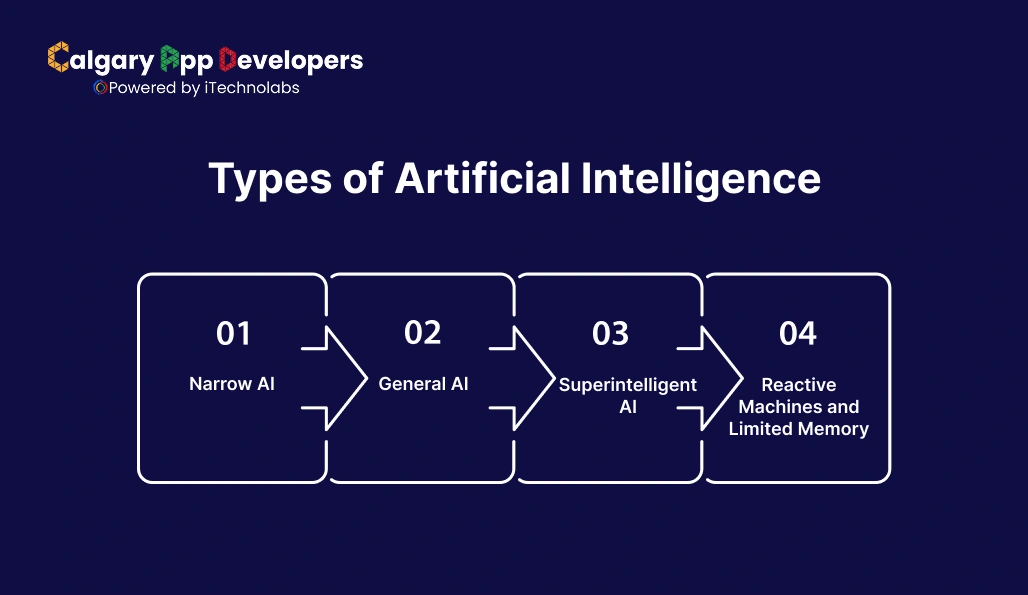
When people talk about AI, they often imagine a futuristic machine that can think like a human. In reality, AI comes in different forms, each with its own scope and capability. Knowing the types helps you understand what’s possible today and what’s still on the horizon.
- Narrow AI: This is the AI we interact with most often. It’s built to perform a specific task and it does it well. Voice assistants, spam filters, and recommendation engines all fall into this category. Narrow AI doesn’t think beyond its designed purpose.
- General AI: This is the kind of AI that could reason, learn, and adapt across a wide range of tasks much like a human. We don’t have it yet, but it’s the goal many researchers are working toward. General AI could shift from diagnosing diseases to writing a novel without being retrained for each task.
- Superintelligent AI: This is more theoretical and often debated. It refers to AI that surpasses human intelligence entirely, not just in speed but also in creativity, strategy, and problem-solving. While it sparks both excitement and concern, it’s still in the realm of speculation rather than practice.
- Reactive Machines and Limited Memory: On a technical level, AI can also be grouped by how it processes information. Reactive machines respond only to current inputs without memory. Limited-memory AI, which is what most modern systems use, can learn from past data to improve decisions.
Understanding these categories keeps expectations grounded. Most of what we build today is narrow AI, but the ideas of general and superintelligent AI show us where the field might be heading.
Read Also: AI App Development Cost Breakdown: From Idea to Launch
AI vs Traditional Programming
If you’ve ever written code before, you know the usual flow. You give the computer a set of instructions and it follows them exactly. That’s traditional programming. Artificial intelligence flips this idea around. Instead of telling the machine what to do step by step, you give it data and let it figure out the rules on its own.
Here’s the key difference. Traditional programming is about certainty, while AI is about adaptability. Traditional code runs the same way every time unless you change the instructions. AI, on the other hand, learns patterns, adapts with experience, and improves as it processes more data.
Side-by-Side Comparison
| Aspect | Traditional Programming | Artificial Intelligence |
| Approach | Explicit rules written by humans | Learns patterns from data |
| Flexibility | Limited, only works as coded | Adapts and improves over time |
| Handling Uncertainty | Struggles with incomplete or messy data | Designed to work with uncertainty and probabilities |
| Examples | Payroll system, calculators, flight booking software | Chatbots, recommendation engines, self-driving features |
| Output | Deterministic, same output for the same input | Probabilistic, output can vary as the model evolves |
What this really means is if you want predictable results in a structured environment, traditional programming is your friend. But if you need systems that can grow smarter with experience and handle complexity, AI is the way forward.
Choosing the Right Programming Language for AI
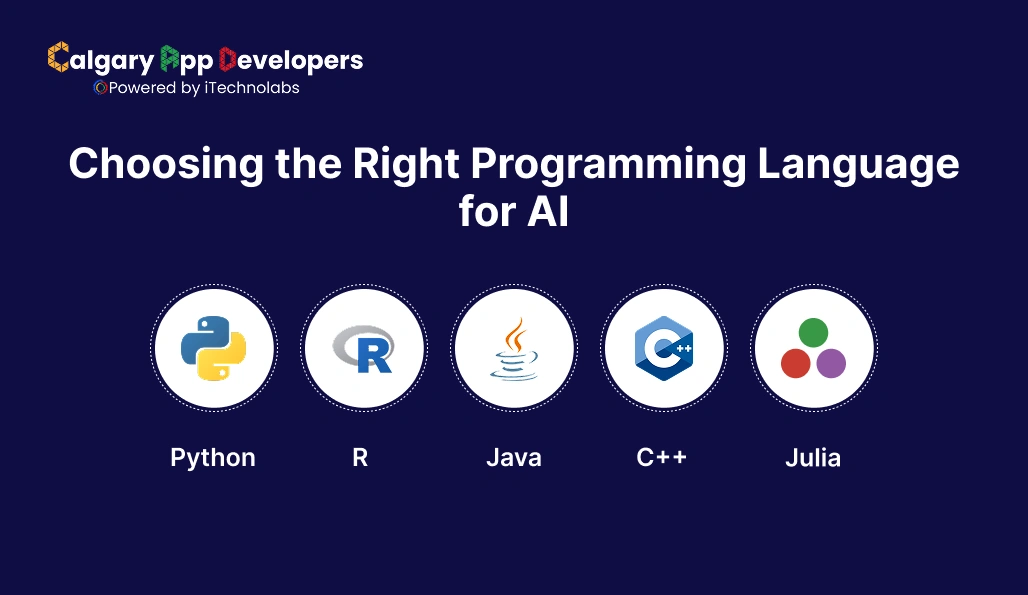
Once you start thinking about how to create an AI, the next big question is which programming language to use. The truth is, there isn’t one perfect language for every AI project. The right choice depends on what you’re building, your background, and the ecosystem of tools available.
- Python: This is the go-to language for most AI projects. It has a huge collection of libraries like TensorFlow, PyTorch, and scikit-learn, making it easier to handle data, train models, and experiment quickly. Its simple syntax is another reason beginners and experts alike lean on it.
- R: Favored by statisticians and data scientists, R shines when you need deep statistical analysis or data visualization. It’s often used in research and academic projects rather than large-scale production systems.
- Java: Known for its stability and scalability, Java is popular when AI needs to be integrated into enterprise systems. It’s commonly used in large organizations that already rely on Java for other applications.
- C++: When performance and speed matter, C++ is a solid choice. It’s often used in areas like robotics, computer vision, or game development, where efficiency is critical.
- Julia: A newer language gaining attention for AI, Julia combines high performance with a syntax similar to Python. It’s especially suited for mathematical and scientific computing.
So how do you decide? If you’re starting out and want the most support, Python is the best entry point. If you’re in research, R could be your friend. For enterprise systems, Java fits well. And if speed is a priority, C++ or Julia may be worth exploring.
Also Read: Best AI Business Solutions Driving Business Growth
Selecting the Right AI Platform and Tools
Picking the right AI platform can make or break your project. Each option comes with its own strengths, so it helps to see them side by side.
| Platform/Tool | Best For | Key Strengths | Example Use Cases |
| TensorFlow | Large-scale projects and deployment | Scalable, backed by Google, strong production support | Image recognition, recommendation systems |
| PyTorch | Research and rapid prototyping | Easy to use, flexible, widely adopted by academia | NLP models, computer vision experiments |
| Google Cloud AI | Businesses in Google ecosystem | Pre-trained models, AutoML, strong infrastructure | Customer service bots, predictive analytics |
| AWS SageMaker | End-to-end ML lifecycle | Managed training and deployment, broad integrations | Fraud detection, personalization engines |
| Microsoft Azure AI | Enterprises using Microsoft tools | Smooth integration, drag-and-drop options | Healthcare diagnostics, enterprise chatbots |
| OpenAI APIs | Plug-and-play advanced AI | No need to train from scratch, quick integration | Chatbots, content generation, coding assistants |
| Hugging Face | NLP-focused projects | Large model library, community-driven | Translation, sentiment analysis |
| Jupyter Notebooks | Learning and prototyping | Interactive coding environment, visualizations | Model testing, educational projects |
The best way forward is to match your project’s stage and scale to the platform. Start with open-source frameworks like PyTorch or TensorFlow if you’re learning or experimenting. Move to cloud platforms like AWS, Azure, or Google Cloud once you need serious infrastructure.
What You’ll Need to Build an AI System
If you’re serious about learning how to create an AI, you need more than just code. Building AI is like preparing a full recipe. You gather the right ingredients, set up the right tools, and follow a process that gets better with practice. Here’s what goes into it:
- Data: The Core Ingredient: AI systems learn from data. If you’re building a recommendation engine, that might mean user behavior data. If it’s a chatbot, you’ll need text conversations. The rule is simple: the more accurate and relevant your dataset, the smarter your AI will become.
- Computing Power: The Engine Behind AI: AI training involves millions of calculations. A standard laptop works for small-scale projects, but serious models need GPUs or TPUs. Many developers start with free or affordable cloud tools like Google Colab before moving to platforms like AWS or Azure.
- Algorithms and Frameworks: The Building Blocks: You don’t have to reinvent the wheel. Frameworks like TensorFlow, PyTorch, and scikit-learn provide pre-built functions to process data and train models. They save you time and give your AI a tested foundation.
- Platforms and Infrastructure: The Deployment Stage: Once your model works, it needs a place to run and scale. Cloud platforms handle this by offering storage, deployment pipelines, and monitoring tools. This is what turns an experiment into a usable product.
- Human Expertise: The Guide: AI doesn’t run on autopilot. You’ll need people who can ask the right questions, clean messy data, and refine the system. Domain experts are especially important because they make sure your AI solves real-world problems instead of just technical puzzles.
- Testing and Feedback: The Finishing Touch: Just like no recipe tastes perfect on the first try, no AI model works flawlessly right away. Testing results, gathering feedback, and retraining your model is what turns a prototype into something reliable.
The bottom line is this: to know how to create an AI, think beyond code. You’ll need data, computing power, frameworks, infrastructure, expertise, and a system for continuous improvement. That’s the true starter kit for building AI that works.
Read Also: AI Integration Services: Smarter Business Solutions
Step-by-Step Guide to Building an AI System
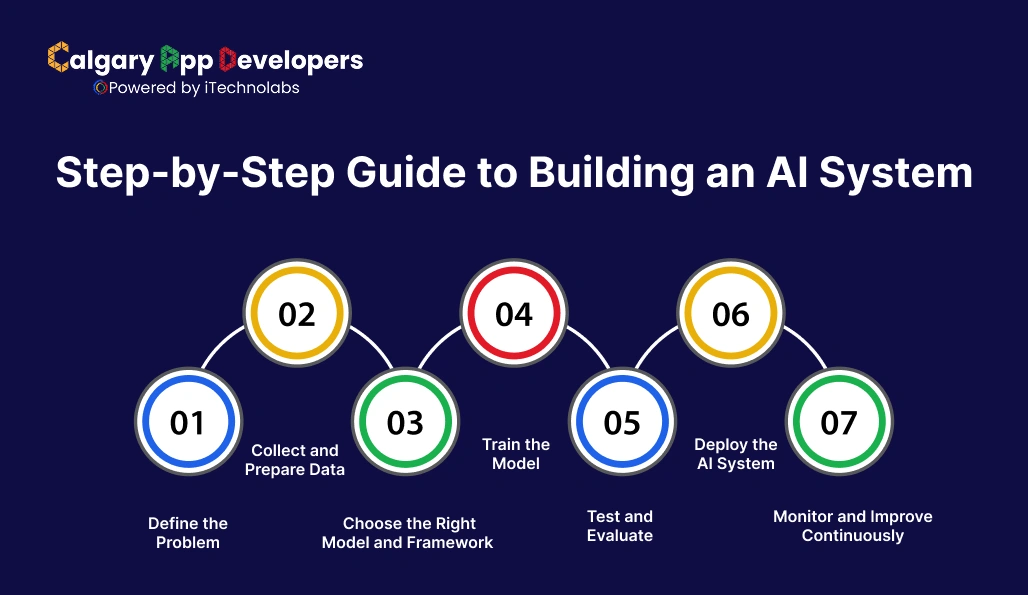
Here’s the complete roadmap explained in 7 practical steps:
Step 1: Define the Problem
Clarify what you want your AI to solve. AI is powerful, but it works best when focused.
Good examples:
- Spam filter that sorts emails automatically
- Forecasting customer demand for a product
- AI assistant that answers common support queries
Why it matters: Without a clear problem, you’ll waste time gathering the wrong data or using models that don’t fit.
Step 2: Collect and Prepare Data
- Gather relevant data from reliable sources (databases, sensors, user logs, open datasets).
- Clean and preprocess: remove duplicates, fix formatting issues, and normalize values.
- Label data if needed (e.g., “spam” vs. “not spam” for an email dataset).
Remember: AI quality depends on data quality. Garbage in equals garbage out.
Step 3: Choose the Right Model and Framework
Select a type of model based on your problem:
- NLP models for chatbots or text analysis
- CNNs for image recognition
- Regression/Decision Trees for predictions
Choose frameworks that give you pre-built tools:
- TensorFlow for production-ready models
- PyTorch for research and experimentation
- scikit-learn for simpler machine learning tasks
Think of this as picking the right toolkit for your specific problem.
Step 4: Train the Model
- Split data into training and validation sets.
- Feed the training set into the model so it learns patterns.
- Adjust hyperparameters (learning rate, batch size, number of epochs) to improve learning efficiency.
- Use GPUs or cloud services if the dataset is large, since training can be resource-heavy.
Expect to repeat this process multiple times until the model’s performance stabilizes.
Step 5: Test and Evaluate
Use a separate test dataset the model has never seen before.
Check results against key metrics:
- Accuracy: overall correctness
- Precision/Recall: how well it identifies specific categories
- F1-score: balance between precision and recall
Compare your results with baseline solutions (like a simple rule-based program) to see if AI is genuinely adding value.
Step 6: Deploy the AI System
Package the trained model so it can be used in real-world applications.
Deployment options:
- As a web service or API (accessible to apps)
- Embedded inside software (chatbot on a website)
- Enterprise system integration (fraud detection in banking)
Don’t forget about scalability: if thousands of people use it at once, the system must handle the load.
Step 7: Monitor and Improve Continuously
- Track how the AI behaves in production. Real-world data is often different from training data.
- Watch for model drift (when accuracy decreases as patterns change).
- Collect fresh data and retrain regularly to keep the AI relevant.
Example: A spam filter trained on 2023 emails might struggle in 2025 unless updated with newer spam trends.
Also Read: AI App Development: Build Intelligent Solutions
Best Practices and Common Challenges
Learning how to create an AI is exciting, but it’s not without hurdles. The difference between a project that works and one that fails often comes down to following best practices and being ready for common challenges.
Best Practices
- Start Small and Specific
- Begin with a focused use case instead of trying to build a complex AI system right away.
- Example: Build a simple chatbot before moving to a multi-language conversational assistant.
- Prioritize Data Quality Over Quantity
- More data is not always better. Clean, labeled, and relevant data often outperforms massive but messy datasets.
- Regularly audit your dataset to avoid biases and errors.
- Choose the Right Tools for the Job: Don’t just use the most popular framework. Match tools to your goals, whether it’s TensorFlow for large deployments, PyTorch for prototyping, or scikit-learn for smaller tasks.
- Iterate and Experiment
- AI development is trial and error. Train, test, tweak, and repeat until the system delivers consistent results.
- Document each iteration so improvements can be tracked clearly.
- Keep Human Expertise in the Loop
- AI should enhance human decision-making, not replace it entirely.
- Domain experts can guide model training to ensure the AI produces meaningful results.
- Focus on Ethics and Transparency: Always check how your AI impacts users. Avoid biased outputs, ensure fairness, and make decisions explainable whenever possible.
Common Challenges
- Data Shortage or Poor Data: Many beginners underestimate how hard it is to find high-quality data. Without it, even the best models will underperform.
- High Computational Costs: Training deep learning models requires expensive GPUs or cloud computing. Costs can quickly add up.
- Overfitting: Models sometimes learn too well from training data and fail on new data. Regular testing and validation are essential.
- Scalability Issues: A model that works in testing might struggle in real-world conditions when thousands of users interact with it at once.
- Changing Real-World Data: AI models degrade over time as the world evolves. This is called model drift. Continuous retraining is the only way to keep systems accurate.
- Ethical and Legal Concerns: Data privacy laws, bias in datasets, and accountability for AI-driven decisions are challenges you must address from the start.
Knowing how to create an AI isn’t just about coding. It’s about planning carefully, avoiding common traps, and building systems that are not only effective but also fair and sustainable.
Read Also: How Much Does It Cost to Hire an AI Developer?
Why Human Expertise Matters at Every Stage
When people think about how AI is built, it often sounds like a fully automated process where algorithms do all the work. That idea misses the most important part. AI only works well because humans guide it at every step.
It starts with problem definition. Domain experts decide what the AI should actually solve. This step prevents wasted effort on patterns that look impressive but deliver no real value. A model trained without clear intent may be accurate on paper and useless in practice.
Next comes data. Humans choose which data matters, how it should be labeled, and what needs to be removed. These decisions shape how the model learns. Poor data choices lead to biased, unreliable, or misleading results, no matter how advanced the algorithm is.
Model selection and training rely heavily on human judgment. Engineers decide which approach fits the problem, how to tune parameters, and when results are good enough to move forward. Automated tools can assist, but they cannot replace experience, context, and intuition.
After deployment, human involvement becomes even more critical. Teams monitor performance, respond to real-world changes, retrain models, and watch for bias or unintended behavior. Without ongoing oversight, AI systems drift, degrade, or produce outcomes that conflict with business goals or ethical standards.
AI does not replace human intelligence. It amplifies it. Human expertise provides direction, accountability, and meaning. That is what turns data and code into AI systems that are useful, responsible, and trusted in the real world.
Conclusion
Learning how to create an AI isn’t about chasing buzzwords. It’s about understanding the core concepts, following a clear process, and being prepared for both the opportunities and the challenges. From defining a problem to collecting data, training models, and deploying them in the real world, each step requires thoughtful planning and human expertise. The exciting part is that AI is no longer limited to tech giants. With the right guidance and tools, businesses of all sizes can now put AI to work.
If you’re ready to take the next step, our team at Calgary App Developers specializes in building smart, practical solutions tailored to your needs. We offer end-to-end AI development services, helping you transform ideas into real products that deliver measurable impact. Whether you want a chatbot, a predictive engine, or a custom AI tool for your business, we’re here to make it happen.
Frequently Asked Questions
- How can businesses determine the ROI of implementing AI software development?
The best way to calculate ROI is by comparing the costs of development and deployment against measurable gains. These gains may include reduced labor costs, faster decision-making, higher customer satisfaction, or increased revenue through personalization. Businesses should set clear key performance indicators (KPIs) before launching an AI project so they can track whether the investment delivers value.
- What ethical considerations should businesses consider when developing AI projects?
Ethics in AI goes beyond compliance. Companies need to ensure their models are free from bias, respect user privacy, and provide transparency in decision-making. Fairness, accountability, and explainability should be built into every AI system to avoid misuse and protect users.
- What are some common challenges that companies face when implementing an AI model?
Typical challenges include limited access to high-quality data, high computational costs, and difficulty scaling models from prototype to production. Many companies also face issues with overfitting, where models perform well on training data but fail with real-world inputs.
- How can companies ensure the security of their AI systems?
AI systems must be protected like any other digital asset. This means securing datasets, encrypting communications, monitoring for adversarial attacks, and updating models regularly. Businesses should also implement strict access controls to ensure sensitive AI models are not misused.
- How can companies stay ahead of the curve in AI technology advancements?
To stay competitive, companies should invest in continuous learning, adopt flexible platforms that evolve with new technologies, and collaborate with AI development partners who are up to date with industry trends. Attending conferences, participating in AI research communities, and testing emerging tools also help businesses remain at the forefront of innovation.


Pankaj Arora is a seasoned technology leader and the Founder of Calgary App Developer, with 10+ years of expertise in crafting high-performance digital solutions. His core competencies include full-stack app development, cloud-native architecture, API integration, and agile product delivery. Under his leadership, Calgary App Developers has empowered startups and enterprises alike with scalable mobile applications, secure web platforms, and AI-driven SaaS products.