







How to Convert App to Flutter | iOS & Android to Flutter
If you built a mobile app the traditional way and are now ready for simplicity and speed, moving to Flutter feels like flipping a switch. Instead of juggling two separate codebases for iOS and Android, you maintain one clean codebase that accelerates bug fixes, shrinks maintenance work, and gets updates into users’ hands faster.
In 2025, as per a Stack Overflow survey, Flutter drives over 45 percent of all cross-platform apps and has 1.5 million active Flutter developers per month.
Also, its momentum in 2026 shows no signs of slowing. Nearly half of developers worldwide are using Flutter for cross-platform projects, and its footprint continues to grow across mobile, web, and desktop platforms. Industry forecasts also expect Flutter to hold a significant share of the cross-platform market as businesses chase faster delivery and smaller total cost of ownership.
This isn’t just convenience. It’s a strategic move backed by real trends pointing toward a future where single-codebase frameworks dominate multi-platform app development.
This blog walks you through everything you need to know before making the move. We will cover the top reasons companies migrate existing apps to Flutter, step-by-step conversion approaches for both iOS app to flutter and Android app to flutter, how to integrate a Flutter module into an existing native project, and what the transition realistically costs in terms of time, effort, and budget.
- Converting an existing app to Flutter replaces multiple native codebases with one shared foundation.
- Flutter enables faster updates, lower maintenance effort, and near-native performance across platforms.
- Migration can be done gradually using Flutter modules without rebuilding the entire app at once.
- Costs and timelines vary, but long-term development overhead is significantly reduced.
- Flutter allows teams to maintain a single codebase for iOS and Android, reducing duplicate work and speeding up feature releases.
- Existing Android and iOS apps can be migrated incrementally by embedding Flutter modules alongside native code.
- Flutter delivers consistent UI and performance across devices by compiling directly to native machine code.
- Migration timelines range from a few weeks to several months, depending on app size, complexity, and existing architecture.
- While upfront migration costs exist, long-term savings come from simplified maintenance, testing, and updates.
Top Reasons to Convert Existing App to Flutter
- One codebase for every platform:
When you choose to port your app to Flutter, you automatically lose the necessity to create and hold two completely distinct projects for Android and iOS. Flutter lets you write once and deploy anywhere, something that not only saves time but also minimizes the possibilities of inconsistencies sneaking into systems in between. The developers no longer need to correct bugs twice or implement the same feature twice for multiple systems. With a shared codebase, your team can spend more time creating improved features rather than losing hours to duplicated code. - Faster time to market:
Speed is as important as quality in today’s competitive app economy. With your app converted to Flutter, you can leverage features such as hot reload, which allows developers to see instant effects of code changes without needing to restart the whole build. This accelerates the feedback loop between design, testing, and development. You can iterate quicker, test better, and deploy your new features or updates into the market earlier compared to native development. These shorter cycles keep you one step ahead of competitors while keeping users hooked with new improvements. - A modern, consistent UI:
One of Flutter’s biggest strengths is its flexible widget system, which makes it possible to deliver sleek, pixel-perfect designs across devices. By converting your app to Flutter, you ensure that your interface feels consistent whether a user is on an iPhone, an Android device, or even a web browser. You are no longer at the mercy of how different operating systems interpret design guidelines. Instead, Flutter gives you complete control over UI components, animations, and layouts. The result is a polished, professional look that feels reliable no matter the platform, which directly improves user trust and satisfaction. - Lower development and maintenance cost:
Building and maintaining separate codebases for Android and iOS is not just time-consuming; it is expensive. Every bug fix, every new feature, and every update doubles in effort and cost. When you shift your app to Flutter, you consolidate all that work into one streamlined system. This cuts down engineering hours, reduces QA overhead, and simplifies long-term maintenance. Many companies that have made this transition report noticeable reductions in operating costs, which frees up budget to invest in product innovation, marketing, or customer support. In other words, the money saved on development directly benefits business growth. - Backed by Google and a thriving community:
Flutter is not an experimental tool that might vanish in a year. It is actively maintained and supported by Google, which ensures long-term stability and innovation. On top of that, there is a thriving global developer community constantly building plugins, libraries, and tools that make development even faster. Converting your app to Flutter means you tap into this vast ecosystem of support and resources. Whether you run into a tricky integration or want to explore the latest functionality, chances are someone in the community has already solved it. This backing gives you peace of mind and confidence in the future of your app. - Performance close to native:
A common worry with cross-platform frameworks is whether performance will take a hit. Flutter solves that problem by compiling directly to machine code instead of relying on a web view or heavy runtime environment. This allows apps built with Flutter to deliver smooth animations, fast load times, and responsive interactions that feel almost indistinguishable from native apps. By converting your existing app to Flutter, you are not trading performance for convenience. Instead, you get the best of both worlds: a cross-platform tool that still provides the kind of performance today’s users expect from high-quality applications.
Converting an Android App to Flutter
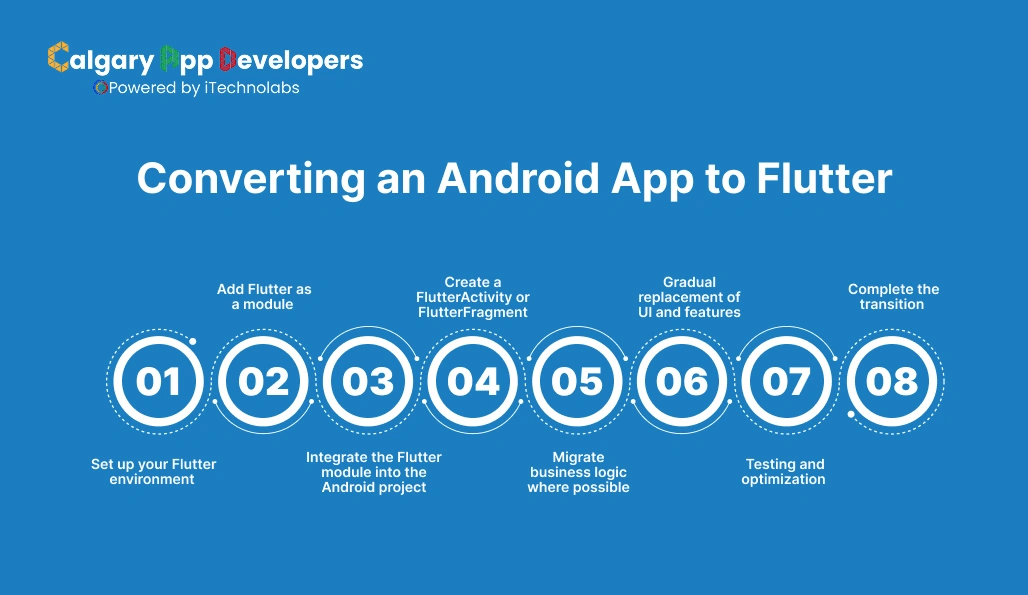
If you already have a working Android app and want to bring it into Flutter, the process is more about smart integration than starting from scratch. The idea is to reuse what you can while gradually moving the rest into Flutter. Let’s break the process down step by step to convert android app to flutter.
- Set up your Flutter environment:
Before anything else, you need to install the Flutter SDK and ensure Android Studio or Visual Studio Code is properly configured. This sets up the base environment where your app to Flutter migration will happen. It is also important to verify you have the latest Android SDKs and Gradle installed so that the existing Android project works smoothly alongside Flutter. - Add Flutter as a module:
The first practical step is to add Flutter as a module inside your existing Android project. This doesn’t wipe out your current code. Instead, you embed Flutter like a library that can coexist with your Java or Kotlin code. You can do this by creating a Flutter module with the command flutter create -t module flutter_module and then linking it to your Android app through Gradle. This gives you the flexibility to test Flutter screens without disrupting your full project. - Integrate the Flutter module into the Android project:
Once the module is created, you need to wire it up. Open your Android app’s settings.gradle file and include the Flutter module as a dependency. Then, modify your app’s build.gradle to make sure the Flutter module is available for builds. This step essentially allows you to call Flutter from your Android project just like you would call another library or feature. - Create a FlutterActivity or FlutterFragment:
To display Flutter screens inside your Android app, you can launch them using FlutterActivity or embed them as FlutterFragment. This lets you gradually introduce Flutter-based UI into the existing application without rewriting the whole thing at once. For example, you might start with a single Flutter-powered screen for a new feature and later expand Flutter’s role across the app. - Migrate business logic where possible:
After you integrate the first Flutter screen, the next step is to move business logic into Dart so it can be reused across platforms. For Android apps heavily tied to native APIs, you can use platform channels to communicate between Dart and Kotlin or Java. This hybrid approach allows you to retain functionality from your Android app while steadily transitioning more logic into Flutter. - Gradual replacement of UI and features:
Instead of rewriting your Android app all at once, most teams choose a phased approach. You replace existing screens with Flutter equivalents over time. This reduces risk, makes testing easier, and allows you to benefit from Flutter’s efficiency while still keeping your app stable. With each iteration, more of your project shifts from being Android-specific to being part of your unified Flutter app. - Testing and optimization:
As you move features, run consistent testing on both Android and iOS to confirm that the Flutter-based screens work as expected. Performance testing is critical because the goal is to ensure your app to Flutter migration delivers smooth, reliable results across devices. - Complete the transition:
Once all major screens and logic have been migrated, your Android app effectively becomes a full Flutter application. From here on, you only need to maintain a single codebase that works across both Android and iOS. This final step unlocks the true advantage of Flutter: faster updates, simpler maintenance, and better user experience across platforms.
Converting an iOS App to Flutter | Convert Swift to Flutter
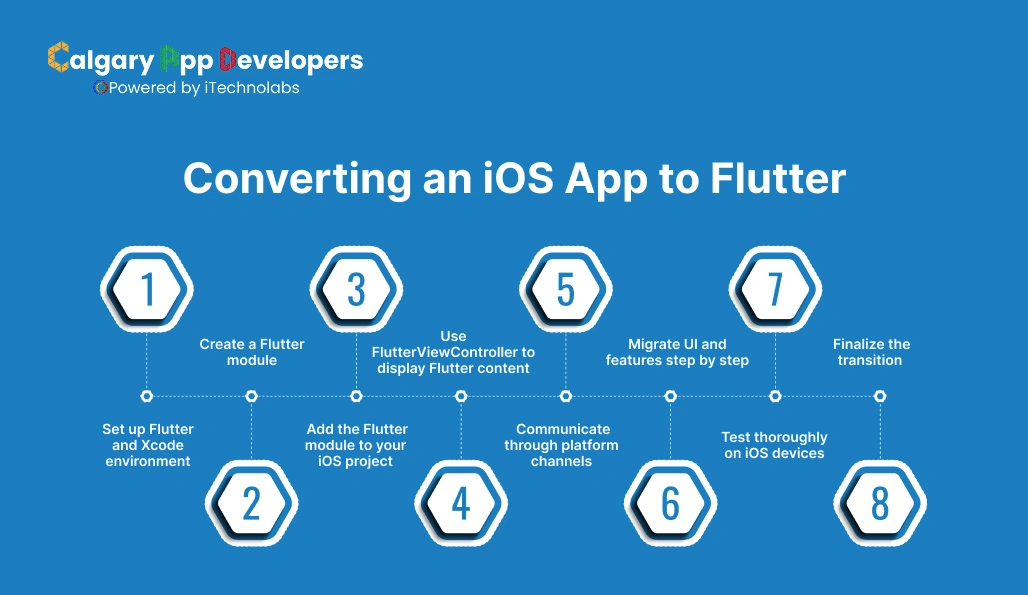
Shifting an existing iOS app to Flutter is a careful process that balances reuse of your current work with the long-term goal of a single cross-platform codebase. Just like with Android, the key is gradual integration rather than starting over. Here’s how the full process works to convert iOS app to flutter.
- Set up Flutter and Xcode environment:
The first step is preparing your development setup. Install the Flutter SDK and make sure Xcode is up to date since it will handle the iOS builds. You’ll also want to install CocoaPods because it manages iOS dependencies, which are essential when linking your app to Flutter. Running flutter doctor at this stage ensures all tools are properly configured for both iOS and Flutter development. - Create a Flutter module:
Instead of throwing away your iOS project, you embed Flutter into it as a module. This is done with the command flutter create -t module flutter_module. This module holds all the Flutter code written in Dart. By keeping it separate at first, you can test features without disrupting the main iOS app. This step marks the beginning of your app to Flutter migration. - Add the Flutter module to your iOS project:
Navigate to your iOS app’s workspace in Xcode and integrate the Flutter module. This usually involves updating your Podfile to include the Flutter framework, then running pod install. This process allows Xcode to recognize Flutter as part of your project. At this point, you can start embedding Flutter code into the app without replacing your entire Objective-C or Swift project. - Use FlutterViewController to display Flutter content:
To actually show Flutter screens inside your iOS app, you use FlutterViewController. This acts as a bridge between your native app and the Flutter module. You can present it as a screen, embed it within a navigation controller, or even display it inside a tab. This allows you to start small, maybe by testing one feature in Flutter, before gradually migrating larger parts of your app. - Communicate through platform channels:
If your iOS app uses native APIs or has custom business logic written in Swift or Objective-C, you don’t have to throw it away. Platform channels let your Flutter code talk to native code. This means you can keep reusing existing functionality while moving more logic into Dart over time. For many teams, this hybrid stage is the most practical way to shift an app to Flutter without losing existing investments. - Migrate UI and features step by step:
The most effective approach is phased migration. Replace native UI screens with Flutter versions gradually. This avoids the risks of a big-bang rewrite while still giving you the benefits of Flutter’s speed and design flexibility. Over time, you’ll find more of your user interface and business logic running in Flutter rather than in Swift or Objective-C. - Test thoroughly on iOS devices:
Testing is critical during this process. Because Flutter aims to create a unified codebase, you need to confirm that every migrated feature works seamlessly on iOS devices of different screen sizes. You’ll also want to verify that performance remains strong since users expect a native-like feel. This ensures that your app to Flutter transition delivers both consistency and quality. - Finalize the transition:
Once all major components have been moved into Flutter, your iOS app is no longer tied to Apple’s ecosystem alone. You now have one Flutter project that powers both Android and iOS, with a single codebase to maintain. This is the stage where the real value shows up: faster development, easier updates, and a product that scales across platforms with less effort.
Integrating a Flutter Module into an Existing Project
Sometimes you don’t need to rebuild everything. Instead, you can integrate Flutter into your current app to begin your Flutter journey. This hybrid approach is perfect when you want to experiment with Flutter in certain parts of your app without rewriting the entire codebase. Here’s how to do it.
- Create a Flutter module
- Run the command flutter create -t module flutter_module
- This generates a standalone Flutter project inside a module folder
- The module holds all your Dart code and can be plugged into Android or iOS projects without disrupting their existing codebase
- Add the module to an Android project
- Update the settings.gradle file to include the Flutter module path
- Add the module dependency inside app/build.gradle
- Sync the project so that Gradle recognizes Flutter as part of your app
- You can now launch Flutter screens using FlutterActivity or embed them as fragments alongside your native Android UI
- Add the module to an iOS project
- Open the iOS project in Xcode as a workspace
- Update the Podfile to include the Flutter module as a dependency
- Run pod install so CocoaPods links Flutter into the app
- Use FlutterViewController to present Flutter-powered screens or embed them within navigation flows
- Handle communication with platform channels
- Use MethodChannel to send data between Flutter (Dart) and native code (Java, Kotlin, Swift, or Objective-C)
- This lets you reuse existing business logic while steadily moving more features into Flutter
- Common examples include calling APIs, accessing device features, or sharing state between Flutter and native screens
- Test integration thoroughly
- Ensure both native and Flutter parts of the app run smoothly side by side
- Test navigation between native and Flutter screens
- Validate performance so users don’t feel a difference when moving between modules
- Scale Flutter’s role over time
- Start with a single screen or feature built in Flutter
- Gradually expand to replace more UI or business logic
- Eventually, your app to Flutter transition can evolve into a full Flutter app while minimizing disruption to existing users
How Long Does It Take to Convert an App to Flutter
One of the first questions developers and businesses ask is how much time it really takes to move an existing app to Flutter. The truth is there’s no single answer because the timeline depends on the size of the app, the complexity of its features, and how much of the native code you plan to keep. Still, we can break it into general phases to give you a clear picture.
- Small apps with basic features
- If your app has a limited number of screens and straightforward functionality like forms, lists, or static content, the migration can be completed in 3 to 5 weeks.
- Most of the time here goes into setting up the Flutter environment, recreating the UI in Flutter widgets, and testing across platforms.
- For small projects, moving an app to Flutter can feel like a quick refresh rather than a major rebuild.
- Medium-sized apps with custom logic
- Apps with APIs, database integration, or a combination of native and third-party libraries usually migrate in 2-3 months.
- Developers often use a phased approach, first adding a Flutter module, then gradually moving features over.
- This timeline includes not only rewriting the UI but also adapting business logic and ensuring platform channels are in place to connect Dart code with any leftover native components.
- Large-scale apps with advanced features
- Enterprise-level apps or consumer platforms with complex functionality, such as payment systems, real-time updates, offline storage, or AR elements, can take 4 to 6 months or more to fully transition.
- These apps usually require careful planning, staged migrations, and multiple testing cycles to ensure nothing breaks during the move.
- Large-scale migrations benefit the most from Flutter in the long run, as maintaining one codebase saves significant time and cost once the transition is complete.
- Other factors that affect timelines
- Team expertise: If your developers are new to Flutter, expect some ramp-up time for learning Dart and Flutter best practices.
- Existing code quality: Clean, modular native code integrates into Flutter more easily compared to heavily coupled or outdated projects.
- Third-party dependencies: Some native libraries may not have direct Flutter equivalents, which means extra time for custom integrations.
What this really means is the time to convert an app to Flutter can range from a few weeks for simple apps to several months for complex ones. The payoff, however, is lasting: once the migration is complete, your team maintains a single codebase and delivers updates faster across both Android and iOS.
What to Expect in Terms of Cost
On average, converting an existing app to Flutter can cost anywhere between $10,000 and $80,000, depending on the size and complexity of the project. Smaller apps sit at the lower end of the range, while enterprise-grade platforms with advanced features fall on the higher end.
Estimated Cost Breakdown
| App Size/Complexity | Features Included | Estimated Cost (USD) | Timeline |
| Small App | Basic screens, forms, simple UI | $10,000 – $20,000 | 3–5 weeks |
| Medium App | API integration, database, some custom features | $20,000 – $40,000 | 2–3 months |
| Large App | Payments, push notifications, third-party libraries | $40,000 – $60,000 | 3–5 months |
| Enterprise App | Advanced features, scalability, multiple integrations | $60,000 – $80,000+ | 4–6+ months |
Factors Affecting the Cost
- App complexity: The more complex your existing application, the more effort is required to convert the app to Flutter. Basic apps with static content cost less, while apps that include real-time updates, payments, or offline support need more engineering time.
- Feature migration: If your native app already includes custom APIs, third-party SDKs, or device-specific functionality, those features may need custom integration in Flutter. This adds to the total cost since developers must create or adapt Flutter equivalents.
- Design requirements: A straight migration that reuses your current design is cheaper than a migration that involves redesigning the app UI. Many teams use the transition to Flutter as a chance to modernize the look and feel, which increases both cost and timeline.
- Team expertise: If your developers are already experienced with Dart and Flutter, the migration will be faster and cheaper. If not, the learning curve can add extra hours and raise the overall cost. Some companies reduce this by working with Flutter specialists for the migration phase.
- Testing and optimization: A big part of the budget goes into ensuring the app works smoothly across iOS and Android after the move. This includes testing performance, device compatibility, and UI consistency. More testing cycles mean higher costs but also ensure a stable product.
- Post-migration maintenance: Once the transition is done, the good news is ongoing costs decrease significantly because you now maintain only one codebase. The upfront investment in moving your app to Flutter often pays off quickly in lower maintenance overhead.
Future Trends Shaping App Migration to Flutter
Converting apps to Flutter is no longer just about reducing code duplication. It is becoming a long-term product strategy as companies rethink how apps are built, scaled, and maintained.
Below are the trends that will define Flutter migrations over the next few years.
- Flutter-first rebuilds will replace native rewrites
More teams are choosing Flutter when rebuilding or modernizing existing apps instead of rewriting separately for iOS and Android. The performance gap with native has largely closed, while the productivity gains are clear. As a result, Flutter is becoming the default choice for second-generation apps rather than an experiment or fallback option.
- Hybrid migrations will become the standard path
The add-to-app model is setting the tone for future migrations. Businesses are embedding Flutter modules into existing native apps to modernize features incrementally. This reduces risk, avoids long freezes on development, and delivers value early without a full rewrite.
Over time, many of these hybrid apps naturally evolve into full Flutter applications.
- One codebase will power more than mobile
Flutter’s expanding support for web and desktop is changing how migration decisions are made. Teams converting to Flutter today are not just thinking about iOS and Android. They are planning for dashboards, internal tools, and future platforms that can all run from the same codebase.
This turns a mobile migration into a broader product unification effort.
- Migration timelines will shrink with better tooling
Flutter tooling is maturing fast. Improved DevTools, stronger plugin ecosystems, and AI-assisted code generation and testing are reducing migration effort. Tasks that once took months are becoming more predictable and easier to automate.
As a result, converting an app to Flutter will require less manual work and fewer specialized resources.
- Flutter expertise will become a hiring advantage
As Flutter adoption grows, teams with Flutter-based products will find it easier to hire and onboard developers. A shared language, shared UI framework, and shared tooling lower the barrier to entry compared to maintaining separate native stacks.
The takeaway is simple. Migrating to Flutter is no longer just a technical clean-up. It is a forward-looking decision that aligns your app with where cross-platform development is clearly headed.
Conclusion
Converting an existing app to Flutter is more than a technical decision. It is a strategy that saves time, cuts costs, and gives your users a consistent, high-performance experience across Android and iOS. Whether you start by adding a Flutter module or go for a full migration, the result is the same: a modern codebase that is easier to manage and built for the future.
If you are considering taking your app to Flutter, the smartest move is to work with a team that has done it before. At Calgary App Developers, our specialized services help businesses transition from native apps to Flutter with minimal disruption and maximum impact. From planning and integration to testing and launch, our experts guide you through every step so your migration is smooth and successful.
Your users expect speed, reliability, and great design. Flutter delivers all three, and we make sure your app gets there. Ready to make the switch? Reach out to Calgary Flutter App Developers today and let’s build something future-proof together.
FAQ’s
1. How do I add Flutter to an existing Android app?
You can add Flutter to an Android app by creating a Flutter module using flutter create -t module flutter_module, then linking it in your Android project’s settings.gradle and build.gradle files. This allows you to launch Flutter screens inside your native app while still keeping your original Java or Kotlin code intact.
2. How to convert Android code to Flutter?
Directly converting Android Java or Kotlin code to Flutter is not possible, since Flutter uses Dart. Instead, you gradually rebuild your app’s UI and business logic in Flutter while using platform channels to connect with existing Android code. This phased approach helps you move your app to Flutter without losing critical features during the transition.
3. How to convert APK to Flutter code?
You cannot convert an APK back into Flutter code. APK files are compiled binaries, not source code. To move your project into Flutter, you need the original Android source code in Java or Kotlin. From there, you can recreate your UI and features in Flutter and integrate it alongside the existing project if needed.
4. How do I convert an Android app to iOS?
You can’t directly convert an Android app into an iOS app. What you can do is rebuild the app in Flutter, which creates one codebase that works for both Android and iOS. Migrating your app to Flutter gives you the ability to run it seamlessly across platforms without maintaining two separate projects.
5. How can you build mobile apps with Flutter?
You build mobile apps in Flutter using the Dart programming language and Flutter’s widget-based framework. Developers write one codebase that compiles into native binaries for both Android and iOS. Flutter also supports web and desktop platforms, making it a versatile choice. Its hot reload feature speeds up development by allowing real-time testing of UI and logic changes.
6. Can I use Flutter within my existing app?
Yes, you can. Flutter can be added as a module inside your existing Android or iOS app. This means you can introduce Flutter screens or features gradually without discarding your native project. Over time, you can expand Flutter’s role until your entire app runs on a single Flutter codebase, simplifying updates and maintenance.


Pankaj Arora is a seasoned technology leader and the Founder of Calgary App Developer, with 10+ years of expertise in crafting high-performance digital solutions. His core competencies include full-stack app development, cloud-native architecture, API integration, and agile product delivery. Under his leadership, Calgary App Developers has empowered startups and enterprises alike with scalable mobile applications, secure web platforms, and AI-driven SaaS products.